Capacitor 8 Upgrade for Lovable Apps
If you wrapped your Lovable app with Capacitor in the last year, it’s almost certainly on Capacitor 7, and Capacitor 7 targets Android API 35. Since August 31, 2026, Google Play only accepts new apps and app updates that target Android 16, API 36. Your app stays in the store. You just can’t ship a bug fix until you move. Google lets you request an extension, and that extension ends November 1, 2026.
So the Capacitor 8 upgrade isn’t optional, and we’ve done a run of them for Lovable apps lately. The actual upgrade is mostly one command. What eats the afternoon is everything around it.
Fix your machine before you touch the project
Capacitor 8 wants newer tools than most people have installed, and npx cap migrate doesn’t check most of them for you. From the official update guide:
- Node 22 or newer
- Xcode 26.0+ for iOS, and the iOS deployment target goes up to 15.0
- Android Studio Otter (2025.2.1) or newer
- JDK 21. The migrate command prints “Capacitor 8 requires JDK 21 or higher. Some steps may fail.” if you’re on 17, and then carries on anyway
The Android Studio one catches people. Open a migrated project in an older Android Studio and Gradle sync dies with:
The project is using an incompatible version (AGP 8.13.0) of the Android Gradle plugin. Latest supported version is AGP 8.12.2That’s not your project being broken. It’s your IDE being two months old. Update Android Studio first and you never see it.
On the Lovable side there’s nothing to do. Lovable doesn’t know Capacitor exists. Your android/ and ios/ folders live in your GitHub repo (or on your laptop), and Lovable keeps editing src/ as before. Do the upgrade on a branch, though. If Lovable pushes to main while you’re halfway through, you’ll be untangling a merge in package-lock.json, which is nobody’s idea of fun.
Running the migration
npm i -D @capacitor/cli@latest
npx cap migrate
It asks “Capacitor 8 sets a deployment target of iOS 15 and Android 16 (SDK 36). Are you sure you want to migrate?”, asks which package manager you use, and then does a surprising amount. It bumps @capacitor/core, cli, ios, android and every official @capacitor/* plugin to ^8.0.0. It sets minSdkVersion = 24, compileSdkVersion = 36 and targetSdkVersion = 36 in android/variables.gradle, along with all the AndroidX versions. It moves Gradle to 8.14.3, the Android Gradle plugin to 8.13.0 and Kotlin to 2.2.20. It sets the iOS deployment target to 15.0 in the Xcode project (and the Podfile, if you use CocoaPods). It adds density to android:configChanges in the manifest, so the WebView stops reloading when the app is resized. Then it runs cap sync and lists the plugins you use that have breaking changes.
It will not touch your web code or capacitor.config.ts, and it won’t help with third-party plugins. That last one is where most of our time goes. One client app had a community in-app purchase plugin pinned to a version with a Capacitor 7 peer dependency, and npm install refused to resolve until we bumped it, and the newer version had renamed two methods. Check every non-@capacitor/ plugin in your package.json before you start, and look at its changelog for an 8.x release. If one has no 8.x release yet, that’s your real blocker, not Capacitor.
The config key that silently stops working
android.adjustMarginsForEdgeToEdge is gone in Capacitor 8. A lot of wrapped apps set it to 'auto' or 'force' last year as the quick fix for Android 15 drawing content under the status bar. After the upgrade the key does nothing, there’s no error, and your header slides back under the clock.
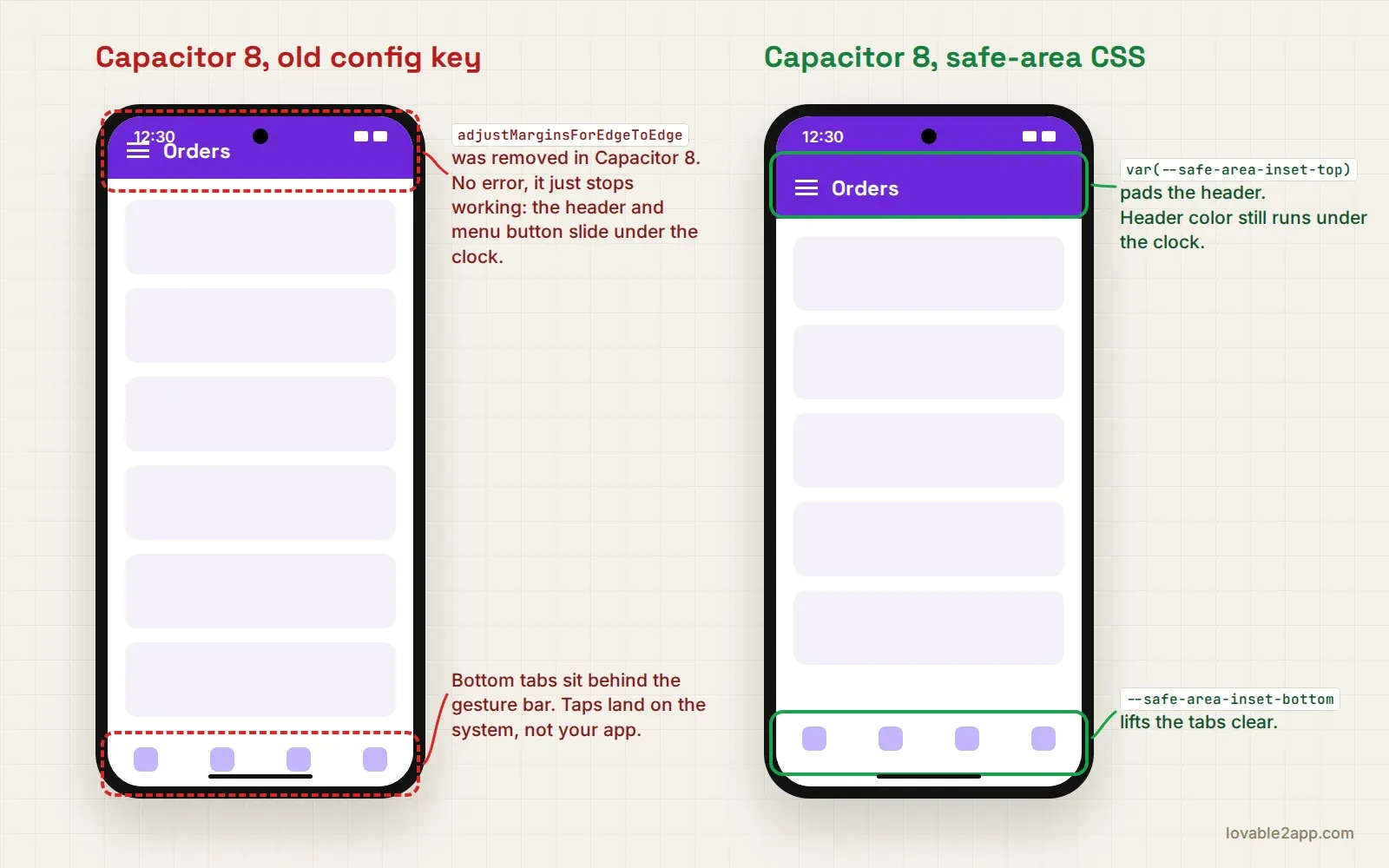
The replacement is CSS. Capacitor 8 ships a System Bars API inside @capacitor/core (there is no @capacitor/system-bars package to install, people keep trying), and it injects --safe-area-inset-top and friends so you can pad your fixed header and bottom nav. The status bar plugin’s setOverlaysWebView() and setBackgroundColor() don’t work on Android 16 at all. I went through the CSS for this in the splash screen and status bar post, so I won’t repeat it here. Just delete the dead config key so the next person doesn’t think it’s doing something.
Smaller things that bit us
Geolocation’s timeout option now applies to every request. Before, on Android, it only applied in some cases. If you had a 5 second timeout that “worked fine”, it may start throwing on slow GPS fixes indoors. Bump it or handle the error.
Android Studio will offer to upgrade the Android Gradle plugin to 9. Say no for now. If you already said yes, older builds of the haptics and keyboard plugins fail with “getDefaultProguardFile('proguard-android.txt') is no longer supported since it includes -dontoptimize”. Version 8.0.1 of both fixes it.
Swift Package Manager is now the default for new iOS projects. Existing ones stay on CocoaPods, which is fine. But if you ever delete ios/ and run npx cap add ios again, you get an SPM project with no App.xcworkspace, and any Fastlane or CI config that points at the workspace breaks with “No .xcworkspace file found”. Either point it at App.xcodeproj or re-add with npx cap add ios --packagemanager CocoaPods. I’d move to SPM eventually. Not in the same week as a forced Play Store upgrade.
Test on a real Android 16 phone before you upload. The emulator is fine for most of it, but we’ve seen a bottom tab bar sitting behind the gesture bar that only showed up on a physical Pixel.
If you’d rather hand this off, it’s the kind of job we do in a couple of days, including the plugin archaeology. Send us the repo or see the app packages.