Capacitor Deep Links for Lovable Apps
The first time most Lovable founders think about Capacitor deep links is the day a tester emails “the password reset link opened Safari and logged me into the website, not the app”. That’s the bug. The link works, it just works in the wrong place, and fixing it touches four things: two small files on your domain, one setting in each native project, a listener in your React code, and your Supabase redirect list.
None of it is hard. It’s just spread across places Lovable never shows you.
What a deep link has to get past
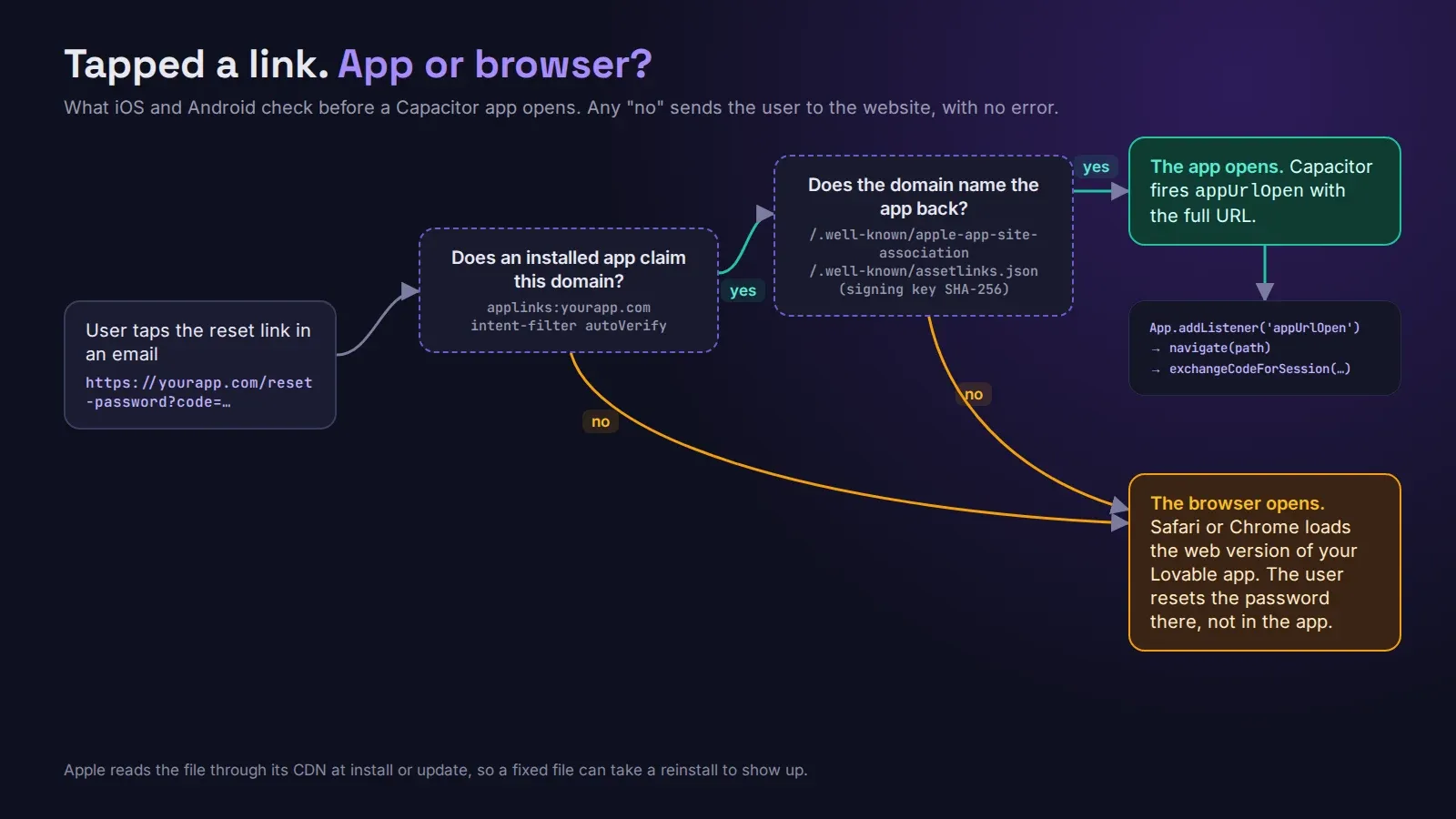
When someone taps https://yourapp.com/reset-password?code=... in an email, iOS and Android each ask the same question: does an installed app claim this domain, and does the domain agree? If both sides say yes, the app opens. If either side is missing, the phone shrugs and opens the browser. There’s no error. That’s why this bug survives testing: on your own phone you probably tapped the link in the browser anyway.
The two files on your domain
iOS looks for https://yourapp.com/.well-known/apple-app-site-association. No .json on the end. It lists your Team ID and bundle ID (ABCDE12345.com.yourapp.app) and which paths the app handles. Apple wants it over HTTPS, served as JSON, with no redirects, and since iOS 14 it fetches the file through Apple’s own CDN when the app is installed or updated, not from your server live. So when you fix the file, an already-installed test build can keep the old answer for a while. Delete and reinstall before you decide it’s still broken.
Android looks for https://yourapp.com/.well-known/assetlinks.json with your package name and the SHA-256 fingerprint of the certificate that signs the app.
That fingerprint is where we lose the most time. If you use Play App Signing (you almost certainly do, it’s the default), Google re-signs your app with its own key. The fingerprint you get from keytool -list -v on your upload keystore is the wrong one for the store build. Copy the App signing key certificate SHA-256 from Play Console → Test and release → App integrity, and put both fingerprints in the file if you also sideload debug builds.
Check both files the boring way before touching the app:
curl -sI https://yourapp.com/.well-known/apple-app-site-association
curl -s  https://yourapp.com/.well-known/assetlinks.json
You want 200, no 301 or 302, and JSON in the body. www.yourapp.com and yourapp.com are different hosts as far as the phone is concerned. If your emails link to one, the file has to be on that one.
The native side
In Xcode, add the Associated Domains capability and an entry applinks:yourapp.com. That ends up in App.entitlements, so make sure it’s committed. We had a client whose links worked on the build from one laptop and not from CI, and the only difference was an entitlements file that never got pushed.
On Android, the intent filter goes inside the main activity in android/app/src/main/AndroidManifest.xml:
<intent-filter android:autoVerify="true">
  <action android:name="android.intent.action.VIEW" />
  <category android:name="android.intent.category.DEFAULT" />
  <category android:name="android.intent.category.BROWSABLE" />
  <data android:scheme="https" android:host="yourapp.com" />
</intent-filter>
autoVerify is what makes Android check your assetlinks.json. On Android 12 and later you can see the result with adb shell pm get-app-links com.yourapp.app; verified is what you want, 1024 or legacy_failure means the file and the app disagree.
The listener Lovable didn’t write
Opening the app is only half of it. Capacitor hands you the URL through the App plugin (@capacitor/app, 8.1.2 right now), and your React Router has no idea it happened:
import { App } from '@capacitor/app';

App.addListener('appUrlOpen', ({ url }) => {
  const u = new URL(url);
  navigate(u.pathname + u.search);
});
Put it somewhere that mounts once, like the top of App.tsx. If the link launched the app from cold, the listener can register too late; call App.getLaunchUrl() on start-up as well and handle that URL the same way.
Supabase auth links
This is the part specific to Lovable apps on Supabase or Lovable Cloud. The web app relies on supabase-js noticing the auth code in the browser’s address bar. Inside the native shell the WebView’s address is the app’s own local URL, not the link someone tapped, so supabase-js never sees the code. You have to pass it yourself in the same listener:
const code = u.searchParams.get('code');
if (code) await supabase.auth.exchangeCodeForSession(code);
Then add https://yourapp.com/reset-password (and any other auth landing paths) to the Redirect URLs in Supabase’s Auth → URL Configuration. Lovable Cloud shows the same setting under its authentication options. If the URL isn’t on that list, Supabase quietly falls back to your Site URL and the user lands on the home page, logged out, wondering what they did wrong.
Some guides suggest a custom scheme like yourapp:// instead. It skips the domain files, but any app can claim the same scheme, and plenty of email clients won’t make it clickable. For password resets and magic links, use the real domain.
If your app is still a website and you’re weighing whether any of this is worth it, start with what a Lovable mobile app actually involves. If you’d rather hand the whole native side to someone who has fixed the fingerprint problem more times than they’d like, get in touch.