Capacitor Local Notifications for Lovable Apps
Most Lovable apps that become mobile apps want a reminder at some point. “Your booking is tomorrow at 10.” “You haven’t logged a workout since Monday.” “Water the plants.” People reach for push notifications, set up Firebase, then discover they needed none of it, because the phone already knows the time.
That’s what Capacitor local notifications are for. The app schedules the notification on the device, and the operating system shows it later, even if the app is closed. No server, no Firebase project, no APNs key. If the message depends only on something the app knows when the user taps “save”, you want local. If it depends on something that happens elsewhere (a new message, a payment, an admin action), you want push notifications instead.
This is for @capacitor/local-notifications 8.3.1, the current release in October 2026. Since 8.3.0 the plugin lives in its own repository, so if a tutorial links you to the old capacitor-plugins folder, the code is the same but the docs there stop at 8.2.1.
The setup is three lines
npm install @capacitor/local-notifications
npx cap sync
Then, somewhere after the user has done something that deserves a reminder:
import { LocalNotifications } from '@capacitor/local-notifications';

const perm = await LocalNotifications.requestPermissions();
if (perm.display !== 'granted') return;

await LocalNotifications.schedule({
  notifications: [{
    id: 4021,
    title: 'Booking tomorrow',
    body: 'Haircut with Sam at 10:00. Tap to see the address.',
    schedule: { at: new Date(booking.startsAt - 24 * 60 * 60 * 1000), allowWhileIdle: true },
    extra: { bookingId: booking.id },
  }],
});
Ask for permission at that moment, not on the first screen. A permission prompt with no context is the fastest way to get a permanent “Don’t allow”, and on iOS you only get to ask once.
Where it actually breaks
The happy path above works in an afternoon. These are the things that cost us a day each on client apps.
The ID is a 32-bit integer
On Android the notification id is a Java int, so it must be between -2147483648 and 2147483647. The obvious move, id: Date.now(), is a 13-digit number and blows straight past that. Lovable’s generated code loves Date.now() for IDs.
We had a habit tracker where reminders worked perfectly on the iPhone the founder tested with and silently never fired on Android. The scheduling call didn’t throw anything useful in the WebView. The fix was one line: derive the ID from the row, for example a hash of the habit’s UUID trimmed to 31 bits, and store it so you can cancel the same notification later. Which you will need, because users change their booking times.
Android won’t be on time unless you ask
Since Android 12, scheduled notifications are not exact unless AndroidManifest.xml has:
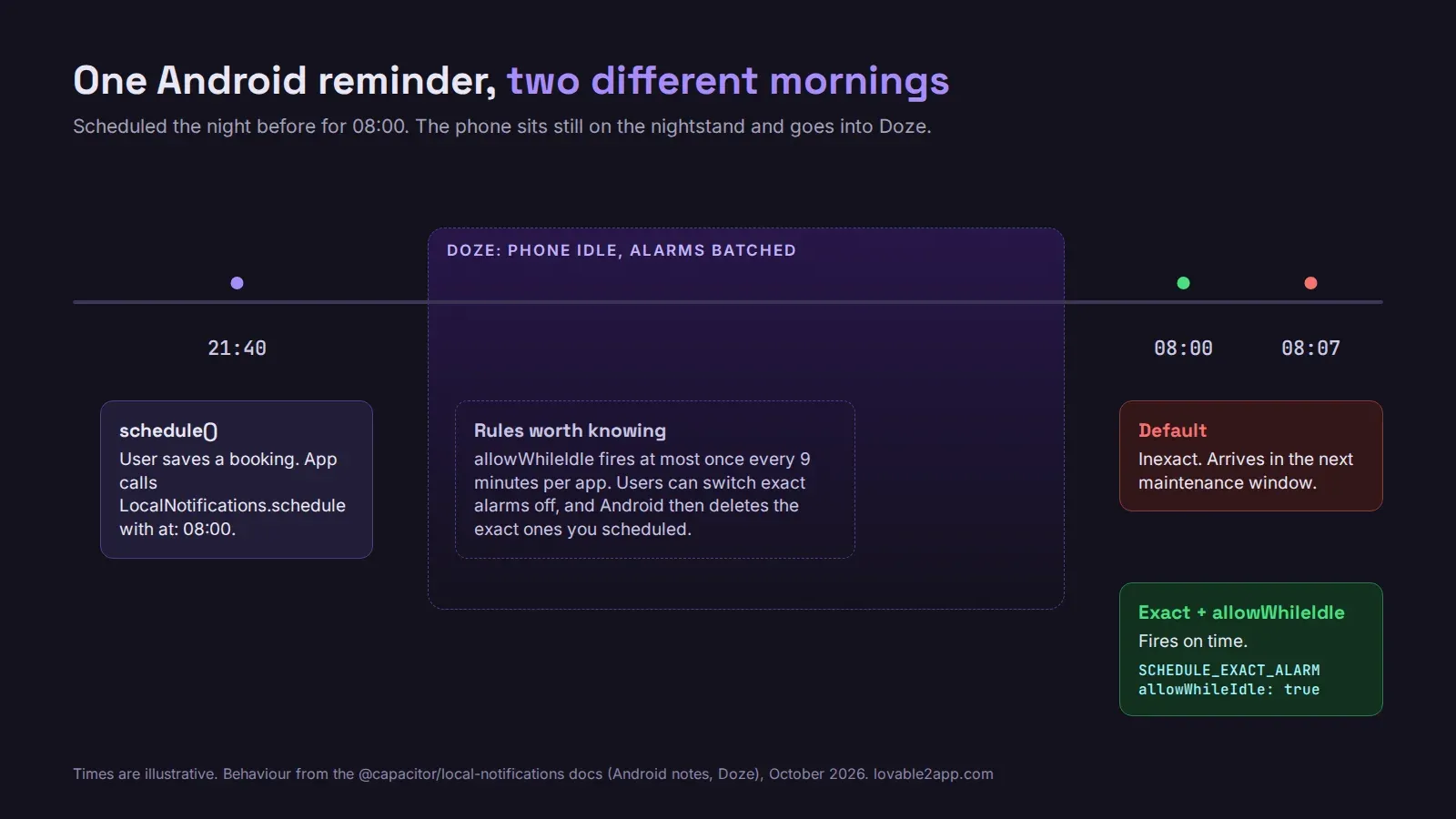
<uses-permission android:name="android.permission.SCHEDULE_EXACT_ALARM" />Even then, users can turn exact alarms off in the app’s settings, and when they do, Android restarts the app and deletes the exact notifications you scheduled. Check checkExactNotificationSetting() when the app comes back to the foreground and reschedule if needed. For a booking reminder, “around 10:00” is fine. For a medication reminder it isn’t, and that’s the one case where USE_EXACT_ALARM (Android 14) is worth the Play Store policy review it invites.
Then there’s Doze. A phone sitting still overnight batches everything. allowWhileIdle: true lets the notification fire anyway, but Android only allows that once every 9 minutes per app. Ten reminders at 7:00 am will not all arrive at 7:00 am.
Channels and icons
On Android 8 and later every notification belongs to a channel. If you pass a channelId that you never created with createChannel(), the notification simply doesn’t fire. No error. Create the channel at app start.
The default sound you set in capacitor.config.ts becomes the channel’s sound on Android 8+, and it can’t be changed afterwards unless the app is reinstalled. Pick it before your first release, not after.
The small icon has to be a white-on-transparent drawable in android/app/src/main/res/drawable. Use your full-colour app icon and Android shows a grey square. Every time.
iOS keeps 64
iOS only keeps the 64 soonest-firing notifications per app, a limit that goes back to the old UILocalNotification days. A “remind me every day for a year” feature that schedules 365 notifications up front quietly loses most of them. Use the repeating options (every: 'day', or on: { hour: 8, minute: 0 }) for regular reminders, and only schedule the next few one-off ones, topping them up when the app opens.
Handling the tap
When the user taps the notification, localNotificationActionPerformed fires with your extra data. Route from there:
LocalNotifications.addListener('localNotificationActionPerformed', ({ notification }) => {
  const id = notification.extra?.bookingId;
  if (id) router.push(`/bookings/${id}`);
});
Register the listener early, before your auth check redirects anywhere, or a cold start from the notification lands on the home screen and the user has to find the booking themselves.
Test on a device, not in the preview
Lovable’s preview runs in a browser, and none of the Android exact-alarm, channel or Doze behaviour exists there. Build to a real Android phone with Android Studio, schedule something two minutes out, lock the phone and put it down. Then do the same on an iPhone. If both buzz, you’re most of the way there.
If you’d rather not spend your week inside Android Studio, this is part of what we do when we turn a Lovable web app into a native iOS and Android app, reminders and push included. Tell us what your app needs to remind people about.