Capacitor Network for Lovable Apps
A web app in a browser tab can get away with ignoring the network. The browser shows its own “no internet” dinosaur and everyone knows whose fault it is. Wrap that same Lovable app with Capacitor and the dinosaur is gone. Now a lost connection looks like your app broke, and on a phone the connection drops all the time: lifts, car parks, trains, the gap between Wi-Fi and 4G when someone walks out of their front door.
The Capacitor Network plugin is how the app finds out. It’s small, it works, and it lies to you in one specific way that’s worth knowing before you build on it.
Installing it
npm install @capacitor/network
npx cap sync
Version 8.0.1 is current as of October 16, 2026, and it matches Capacitor 8. If you’re still on 7, upgrade the core first; mixing majors across Capacitor plugins is how you get native build errors that mention neither.
The API is two things. Network.getStatus() returns { connected, connectionType }, where the type is wifi, cellular, none or unknown. And Network.addListener('networkStatusChange', ...) calls you whenever that changes. On the web build it falls back to the browser’s own online and offline events, so the same code runs in Lovable’s preview.
The lie: connected doesn’t mean online
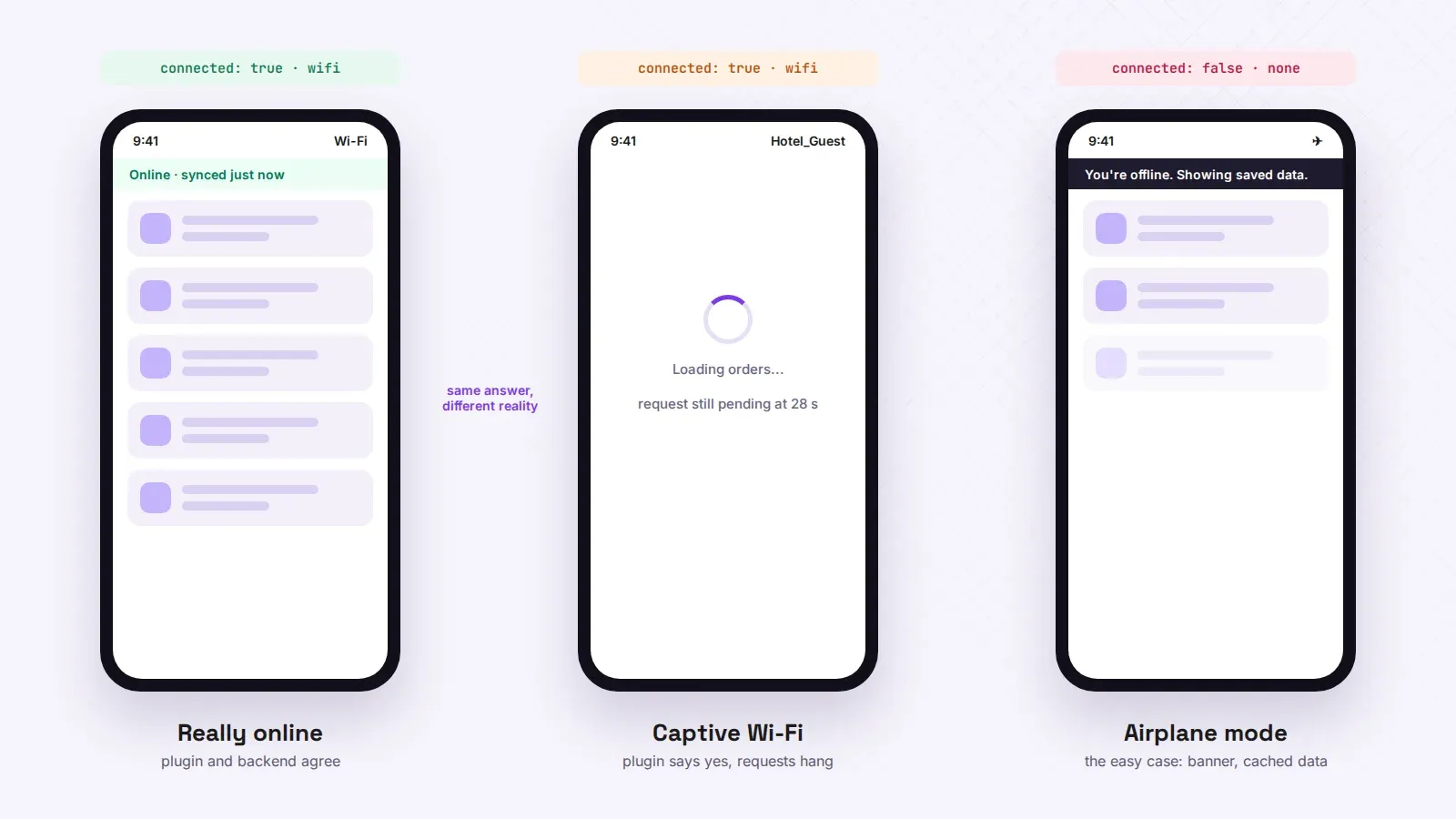
connected: true means the phone is attached to a network. It does not mean that network reaches the internet, and it definitely doesn’t mean it reaches your Supabase project.
Hotel and café Wi-Fi with a login page is the classic case. The phone joins, the plugin says connected: true, connectionType: 'wifi', and every request your app makes hangs until it times out, because the router is waiting for someone to accept the terms. We had a field-inspection app hit this in a warehouse whose guest Wi-Fi did exactly that. The app showed a spinner for 30 seconds on every screen, the plugin cheerfully reported Wi-Fi, and the inspectors assumed the app was broken. They weren’t wrong.
So treat the plugin as a fast “definitely offline” signal and nothing more. When it says connected, confirm with a real request to your own backend, short timeout, before you show “online”:
async function canReachBackend(): Promise<boolean> {
  const ctrl = new AbortController();
  const t = setTimeout(() => ctrl.abort(), 4000);
  try {
    // any tiny public endpoint you own; a Supabase REST call works
    const r = await fetch(`${import.meta.env.VITE_SUPABASE_URL}/rest/v1/`, {
      headers: { apikey: import.meta.env.VITE_SUPABASE_PUBLISHABLE_KEY },
      signal: ctrl.signal,
    });
    return r.status < 500;
  } catch {
    return false;
  } finally {
    clearTimeout(t);
  }
}
The white screen nobody tests
Before any of that matters, check how the app loads its code. A lot of quick Lovable wraps set server.url in capacitor.config.ts to the live lovable.app address, so the native app is really a browser pointed at your website. It’s the fastest way to get a build on a phone, and offline it’s a disaster: the very first launch without a connection gives Android’s net::ERR_INTERNET_DISCONNECTED page or a blank white view on iOS. No banner you write can show, because your code never loaded.
Bundle the build instead. Run npm run build, point webDir at dist, drop server.url, npx cap sync. Now the screens open offline and only the data needs a network. Apple’s reviewers are also a lot less suspicious of an app whose interface ships inside the binary.
Wiring it into your data fetching
Most Lovable apps fetch through TanStack Query. It has its own idea of online and offline (it listens to the browser), and inside a native wrapper that’s less reliable than the plugin. Hand it the plugin’s status so queries pause instead of failing and retry when the connection comes back:
import { onlineManager } from '@tanstack/react-query';
import { Network } from '@capacitor/network';

onlineManager.setEventListener((setOnline) => {
  Network.getStatus().then((s) => setOnline(s.connected));
  const sub = Network.addListener('networkStatusChange', (s) => setOnline(s.connected));
  return () => { sub.then((h) => h.remove()); };
});
Mutations need a decision rather than code. If a user submits a form offline, either queue it and say so (“saved, will send when you’re back online”) or block the button and say that. Don’t show a success toast for something that’s sitting in memory and dies when they swipe the app away. That one generates angry support emails, and they’re right.
Re-check on resume
Phones suspend apps in the background, and a status change that happens while yours is suspended can be missed. Don’t rely on the event alone. When the app comes back to the foreground (App.addListener('appStateChange', ...) from @capacitor/app), call getStatus() again and run the backend check. It’s three lines and it fixes the “app says offline but I’m clearly on Wi-Fi” reports that are otherwise impossible to reproduce at your desk.
The banner
Keep it boring. A thin bar at the top, “You’re offline”, gone the moment you’re back, no modal. Disable the actions that need the network and leave everything already loaded readable. A user standing in a car park wants to see the order they opened five minutes ago, not a full-screen apology.
If your Lovable app is already wrapped and does the white-screen trick, or you’d rather not wire all this up yourself, tell us about it and we’ll look at the build.