Capacitor Storage: Keep Users Logged In
Capacitor storage is the boring topic nobody thinks about until users start emailing “why do I have to log in again every few days?”. In a Lovable app wrapped with Capacitor, the answer is nearly always the same line. Open src/integrations/supabase/client.ts and you’ll find it:
auth: {
  storage: localStorage,
  persistSession: true,
  autoRefreshToken: true,
}
On the web that’s fine. Inside a native app it puts your users’ login session somewhere the operating system is allowed to throw away.
localStorage in a WebView is not yours to keep
Capacitor’s own storage guide is blunt about this. localStorage is fine for a little temporary data, but it “must be considered transient”, because the OS can reclaim web view storage when the device runs low on space. IndexedDB gets the same treatment on iOS. So the user with a 64 GB iPhone that’s permanently at 98% full is the one who keeps getting logged out, and you’ll never reproduce it on your own phone.
There’s a second way to lose it, and this one is self-inflicted. localStorage belongs to an origin. In a Capacitor app the origin is capacitor://localhost on iOS and https://localhost on Android by default, and if that changes, the old data is still on the device but your app can’t see it any more.
One client of ours found that out the hard way. Their Android app had been built on Capacitor 5 with no androidScheme set, which meant http. They upgraded to Capacitor 6 to fix an unrelated plugin issue, shipped it on a Thursday, and by Friday morning the Play Console reviews had five one-star ratings saying the update “deleted my account”. Nothing was deleted. Capacitor 6 made https the default scheme for existing apps, the origin moved from http://localhost to https://localhost, and every saved session became invisible. The upgrade guide does warn about it, and the fix is one line (server.androidScheme: 'http' in capacitor.config.ts) if you catch it before release. They didn’t. We shipped a patch the same day, and those users still had to sign in once more.
Move the session to Capacitor Preferences
@capacitor/preferences is the official key/value plugin. It writes to UserDefaults on iOS and SharedPreferences on Android, which the OS doesn’t clean up behind your back. Data only goes away when the app is uninstalled.
npm install @capacitor/preferences
npx cap sync
Supabase’s client accepts any storage object with getItem, setItem and removeItem, and they’re allowed to be async. So the adapter is about ten lines:
import { Capacitor } from '@capacitor/core';
import { Preferences } from '@capacitor/preferences';

const nativeStorage = {
  getItem: async (key: string) => (await Preferences.get({ key })).value,
  setItem: (key: string, value: string) => Preferences.set({ key, value }),
  removeItem: (key: string) => Preferences.remove({ key }),
};

export const supabase = createClient<Database>(SUPABASE_URL, SUPABASE_PUBLISHABLE_KEY, {
  auth: {
    storage: Capacitor.isNativePlatform() ? nativeStorage : localStorage,
    persistSession: true,
    autoRefreshToken: true,
  },
});
The web build keeps using localStorage, the native builds use Preferences, and the rest of the app doesn’t change.
Now the Lovable-specific annoyance. That client.ts file opens with a comment saying it’s generated and shouldn’t be edited. We edit it anyway, because that’s where the client is created, and we add a line to the project’s Knowledge telling Lovable to keep the custom auth storage. Then we look at the file after every pull from GitHub. It’s a hack. I’d still do it this way over wrapping the client in a second file that half the codebase forgets to import.
Don’t log everyone out on the update
If your app is already live, the people using it have their session in localStorage. Ship the adapter on its own and every one of them gets signed out once. Copy the old value across on first launch instead. supabase-js stores the session under sb-<project-ref>-auth-token:
const key = `sb-${PROJECT_REF}-auth-token`;
const old = localStorage.getItem(key);
if (Capacitor.isNativePlatform() && old && !(await Preferences.get({ key })).value) {
  await Preferences.set({ key, value: old });
}
Run that before anything calls supabase.auth.getSession(). Leave the localStorage copy alone for a release or two, it does no harm.
The App Store email you’ll get
Preferences uses UserDefaults, and UserDefaults is on Apple’s list of “required reason” APIs. Upload a build without declaring it and App Store Connect emails you an ITMS-91053 “Missing API declaration” warning. Add a PrivacyInfo.xcprivacy file to ios/App with NSPrivacyAccessedAPICategoryUserDefaults and the reason CA92.1. Five minutes in Xcode, and it’s one fewer surprise during App Store review.
What Preferences is not
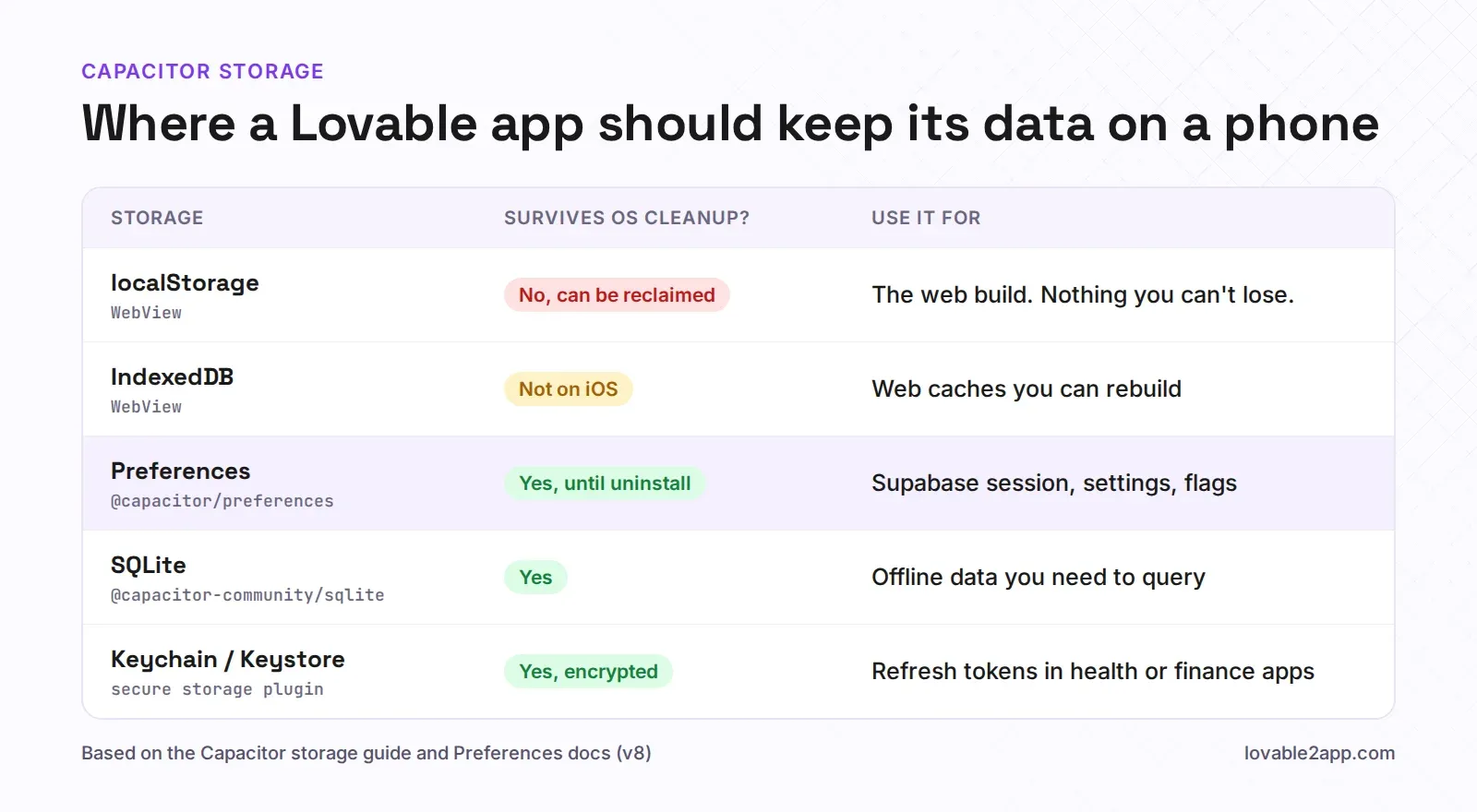
It stores strings only, so objects go through JSON.stringify and JSON.parse. It has no queries. The docs say directly that it “is not meant to be used as a local database”. Session tokens, a theme setting, a “seen onboarding” flag, the last selected workspace: perfect. A cached copy of 4,000 orders for offline mode: no. That’s SQLite territory, usually the community plugin @capacitor-community/sqlite, and it’s a real chunk of work, so be sure you need offline before you start.
It also isn’t encrypted. UserDefaults is a plist inside the app’s sandbox. For most apps that’s the same exposure localStorage had, and I’m fine with it. For a health, finance or anything-with-a-lawyer app, put the refresh token in the iOS Keychain and Android Keystore through a secure storage plugin, and keep Preferences for the harmless stuff.
Getting storage right is one of those jobs that takes an afternoon before launch and a week of support emails after. If you’d rather we did it along with the rest of the native build, tell us about your app.