App Tracking Transparency for a Lovable App
Your Lovable app needs the App Tracking Transparency (ATT) prompt on iOS if anything inside it tracks people for ads: a Meta Pixel, a TikTok pixel, Google Ads conversion tags, an attribution SDK, or an analytics tool that shares data with ad networks. Apple says this applies inside a WebView too. If the app does none of that, you don’t need the prompt, and adding it anyway can get you rejected.
That second part surprises people. Here’s how to tell which side you’re on, and what to put in the Capacitor project.
Apple’s definition, and the WebView answer
Apple’s user privacy and data use page defines tracking as linking data from your app with data from other companies’ apps, websites or offline properties “for targeted advertising or advertising measurement purposes”, or sharing it with data brokers. Since iOS 14.5 you need the user’s permission through ATT to do that, or to read the device’s advertising identifier.
The FAQ on the same page has the line every Capacitor app should read. Asked whether tracking inside a WebView needs the prompt, Apple answers: “Yes. If you are using a webview for app functionality, it should be treated the same way as native functionality in your app.”
A Capacitor app is your Lovable web app running in a WebView. So the Meta Pixel you added to the Lovable project for your Instagram ads is tracking, in the eyes of App Review, the moment it ships inside the iOS app. Same for a Google Ads tag, a Hotjar-style tool that feeds ad audiences, or an affiliate script.
Things that are usually not tracking: Supabase auth, your own database, crash reporting, and first-party analytics that you don’t share with ad platforms. Plausible, PostHog with its default settings, Sentry. Read each vendor’s privacy terms, though. Apple counts “placing a third-party SDK in your app that combines user data from your app with user data from other developers’ apps” as tracking “even if you don’t use the SDK for these purposes.”
How the rejection actually reads
We see two versions of it, and they’re opposites.
You track, but never ask. The App Privacy section in App Store Connect says “Data Used to Track You”, or the reviewer spots a pixel in the network traffic, and there’s no ATT prompt in the app. That’s guideline 5.1.2. The reviewer’s note usually says they couldn’t find the App Tracking Transparency request, and asks where it is.
You ask, but don’t track. The app shows the prompt, or has NSUserTrackingUsageDescription in its Info.plist, while the privacy label says you collect nothing for tracking. Apple wants the label and the behaviour to match. One founder we helped had copied an Info.plist from a tutorial, prompt string and all, into an app with no ads anywhere. Rejected, and the fix was deleting four lines.
So before you write any code, decide: do we keep the pixel inside the iOS app, or not? Lots of apps only need it on the marketing site, not behind the login. Removing the pixel from the in-app routes is often the cleanest fix.
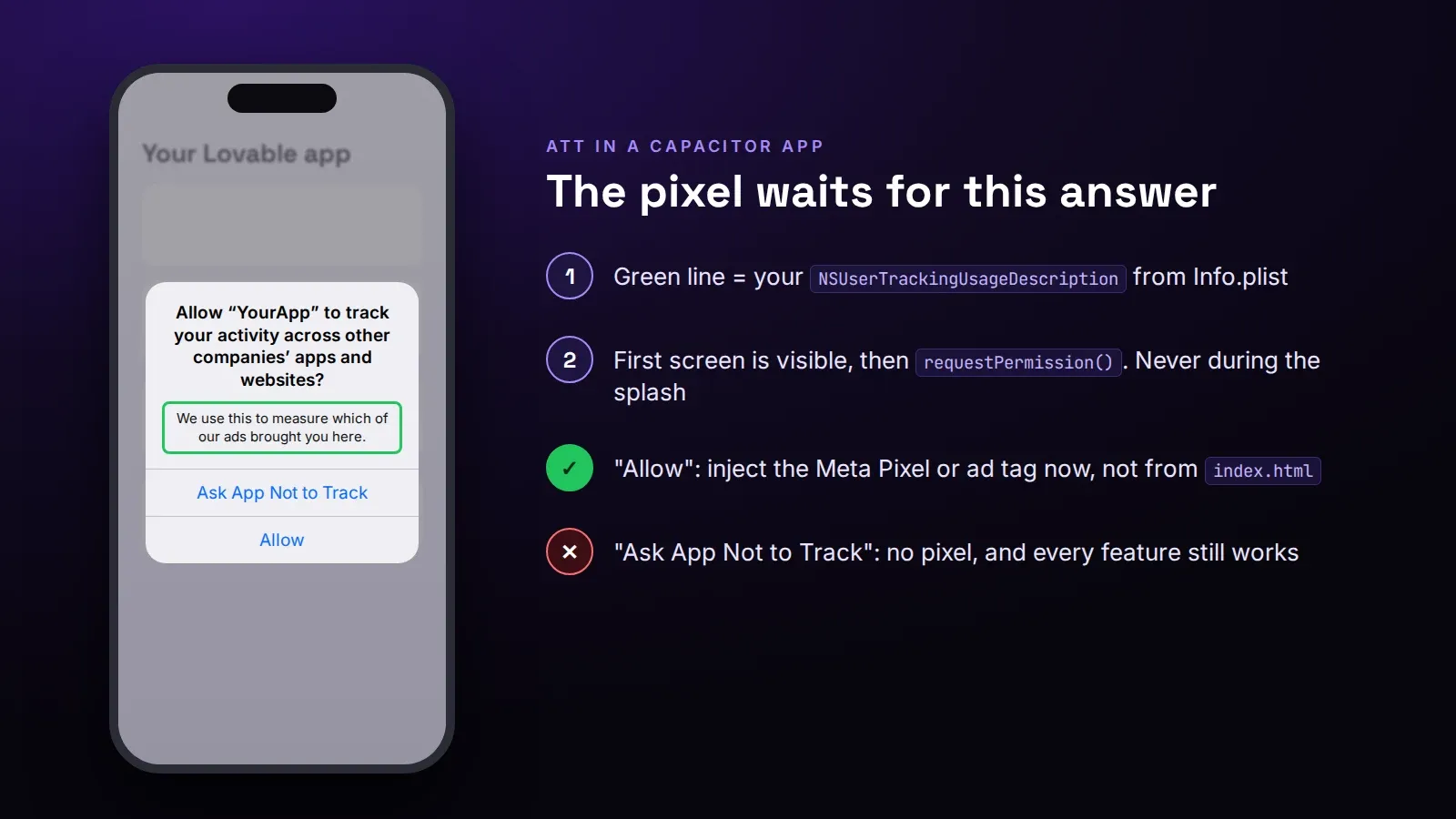
Adding the prompt to a Capacitor app
If you keep the tracking, three things have to happen.
1. The purpose string. In ios/App/App/Info.plist:
<key>NSUserTrackingUsageDescription</key>
<string>We use this to measure which of our ads brought you here.</string>
Write what you actually do. “To give you a better experience” is the kind of vague text App Review sends back.
2. Ask before anything tracks. Install a plugin. capacitor-plugin-app-tracking-transparency (version 3 supports Capacitor 7 and 8 through Swift Package Manager) is the one we use most; Capgo also publishes one for Capacitor 8.
npm install capacitor-plugin-app-tracking-transparency
npx cap sync ios
import { Capacitor } from '@capacitor/core';
import { AppTrackingTransparency } from 'capacitor-plugin-app-tracking-transparency';
export async function canTrack(): Promise<boolean> {
if (Capacitor.getPlatform() !== 'ios') return true; // web and Android decide elsewhere
let { status } = await AppTrackingTransparency.getStatus();
if (status === 'notDetermined') ({ status } = await AppTrackingTransparency.requestPermission());
return status === 'authorized';
}Then load the pixel only when canTrack() returns true. In a Lovable app the pixel is usually pasted into index.html, which means it fires before any of your code runs. Move it into a small function that injects the script after the check. That’s the edit Lovable’s chat tends to get wrong, by the way: it adds the prompt and leaves the pixel in index.html, so the tracking still happens before the user answers.
3. Don’t punish “Ask App Not to Track”. Apple’s FAQ is blunt: you can’t gate features on agreeing, and you can’t offer a reward for it. A screen before the system prompt explaining why is allowed, as long as it’s honest and doesn’t push. A big “Continue” that leads to the prompt and a tiny “no thanks” is the kind of thing that gets flagged.
Two smaller details. The system prompt won’t show while the app is still launching, so call it after the first screen is visible, not in the splash screen. And iOS shows it once. If someone says no, you can link them to Settings, but you can’t ask again.
The privacy label has to agree
In App Store Connect, under App Privacy, every data type a tracking script collects has to be marked “used to track you” if it’s shared for ads. Meta’s pixel typically means at least device ID and product interaction, sometimes purchase data. If your label says no tracking and the code tracks, that’s the first rejection above. If you’re not sure what a script sends, open Safari’s Web Inspector on a test build and watch the network tab while you click through the app.
Most rejections we fix for Lovable apps are about 4.2 (minimum functionality), but ATT mismatches are a steady second. Our App Store rejection fix is $350 flat: we change what Apple flagged, resubmit within 3 days and answer the reviewer on that submission. If the app isn’t in the store yet, we publish Lovable apps to the App Store and Google Play for $300, $600 or $1,000 by size, with the ATT question settled before the first submission.