Capacitor Android for Lovable: First Build
To run a Lovable app as a Capacitor Android app you need Node 22 or later, Android Studio 2025.2.1 or later, and your project’s code from GitHub. Then it’s npm install @capacitor/android, npx cap add android and npx cap open android. Unlike iOS, you don’t need a Mac: Windows and Linux are fine.
That’s the part the Capacitor Android docs cover, checked November 5, 2026, with Capacitor 8 current and 9 listed as “next”. What follows is the part they don’t, the stuff that actually eats the first afternoon. If you already did the iOS side, read our Capacitor iOS first build for the setup both platforms share; I won’t repeat it all here.
The versions, in one place
From the environment setup page: Android Studio 2025.2.1 (Otter) or newer, Node 22 or newer, and the Android SDK platform for API 24 or higher installed. Capacitor 8 apps run on Android 7 (API 24) and up, and target Android 16 (API 36). You don’t install a JDK yourself. Android Studio ships the one Gradle needs, JDK 21.
The Android Studio version is the one people skip. Open a Capacitor 8 project in an older Studio and the Gradle sync fails with “The project is using an incompatible version (AGP 8.13.0) of the Android Gradle plugin”. Nothing is wrong with your project. Update the IDE.
And when Studio offers to upgrade the Android Gradle plugin to 9, click no. We covered why in the Capacitor 8 upgrade post.
Adding the platform
npm install @capacitor/android
npx cap add android
npm run build
npx cap sync android
npx cap open android
cap add android creates an android/ folder with a real Gradle project. Commit it. Your icons, permissions in AndroidManifest.xml, signing config and version numbers all live there.
Before you run anything, check webDir in capacitor.config.ts. Lovable projects started since mid-2026 are TanStack Start apps whose normal build is a server bundle with no index.html, so cap sync either fails or copies the wrong thing. It’s the same fix as on iOS (a client-only build in its own folder), and it’s the first thing to sort out on either platform.
The four things that break first
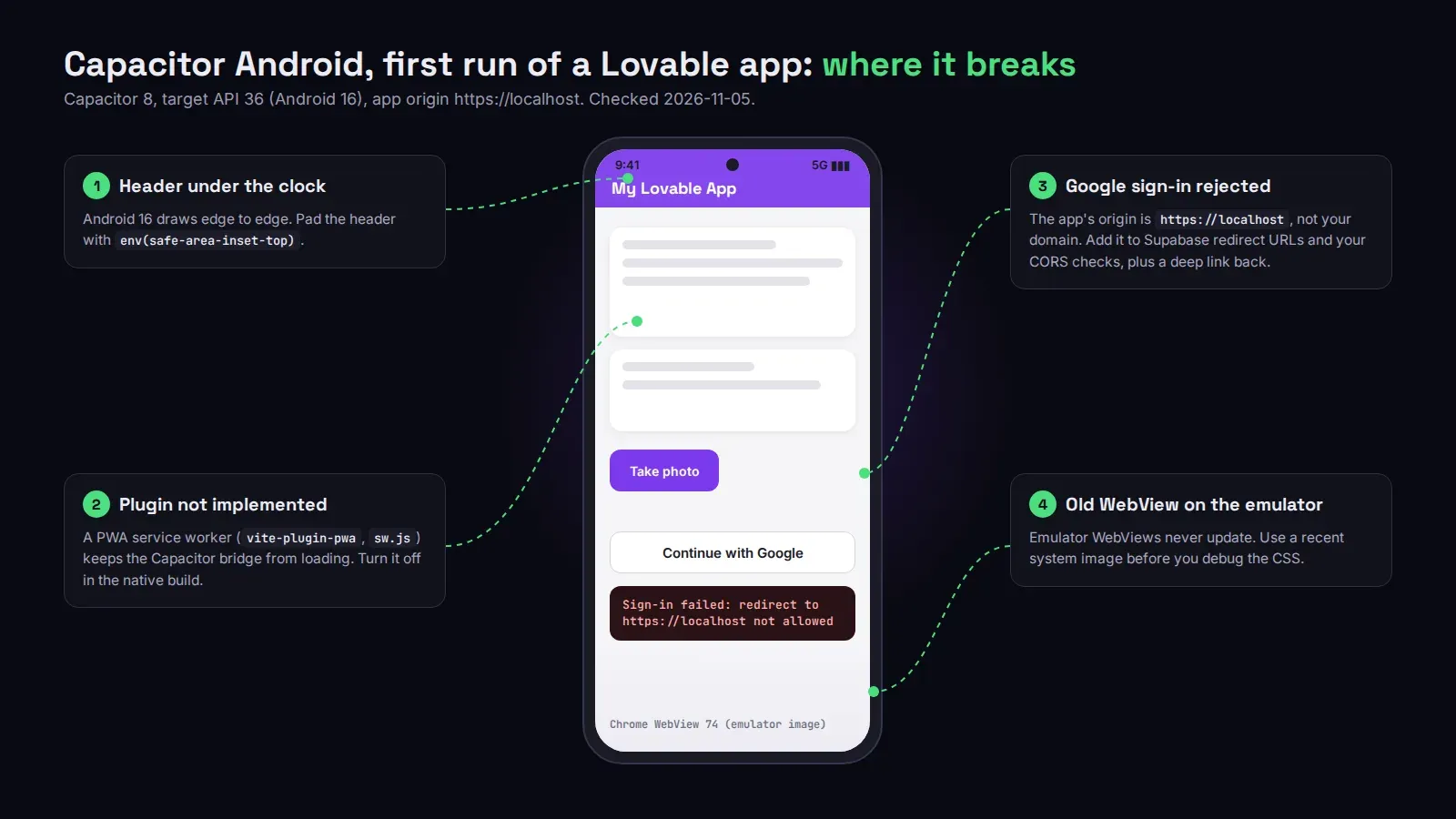
“Plugin not implemented”, but the plugin is installed. This one is very Lovable-specific. A lot of Lovable apps were asked at some point to “make it a PWA” or “work offline”, so they ship a service worker, often through vite-plugin-pwa. Capacitor’s troubleshooting guide says it plainly: service workers can stop Capacitor from injecting its code. Inside the app the service worker serves cached pages, the bridge never loads, and every native call fails. We spent most of an afternoon on a client’s app where the camera button did nothing on Android and worked fine on iOS before anyone thought to look for a sw.js. Turn the service worker off in the native build. The website can keep it.
The header sits under the clock. Capacitor 8 targets Android 16, where apps draw edge to edge and the old config key that kept content below the status bar is gone. Your top bar slides under the system icons. The fix is CSS, env(safe-area-inset-top) padding on the header, which you’ll want on iOS anyway.
Login works on the website, fails in the app. On Android the app’s origin is https://localhost (on iOS it’s capacitor://localhost). Supabase redirect URLs, OAuth callbacks and the CORS checks in your own edge functions were all written for your domain. Add the app’s origin, and for Google or Apple sign-in add a deep link so the browser can hand the session back to the app. Email and password login usually works without any of this, which is why people think the app is fine until someone taps “Continue with Google”.
It works on your phone but not the emulator, or the other way round. The Capacitor docs note that the system WebView doesn’t update itself on emulators. An emulator on an old system image runs an old Chrome WebView, and modern CSS or JavaScript breaks there in ways you’ll never see on a real phone. Use a recent system image and stop debugging Chrome versions from 2019.
Two smaller ones. “Unable to locate a Java Runtime” in the terminal means JAVA_HOME isn’t set; point it at the JDK inside Android Studio, which the docs give for macOS as /Applications/Android Studio.app/Contents/jbr/Contents/Home. And “APK can’t be installed” usually means an old build with the same package name is still on the device. Uninstall it.
Before the Play Store
Pick the application ID in capacitor.config.ts carefully, because Google Play ties the listing to it forever. Then the store side: Google Play wants an Android App Bundle (.aab), not an APK, and everything uploaded after August 31, 2026 has to target API 36, which Capacitor 8 already does. Our Android App Bundle post walks through signing and the version code. A new personal developer account also needs 12 testers for 14 days before it can publish, which is in our Google Play developer account post.
Most founders get the app running on their own phone in a day. Getting it accepted is a different week. If you’d rather hand over both, we publish Lovable apps to Google Play and the App Store from $300, with your app still built in Lovable afterwards.