Capacitor iOS for a Lovable App: First Build
Getting a Lovable app running as a Capacitor iOS app takes four commands and one Mac. Getting it to build cleanly the first time takes a bit more, and almost none of the extra is in the docs. This is the version we’d hand a founder who wants to try it themselves before deciding whether to pay someone.
Facts below are from the Capacitor iOS docs, checked November 4, 2026. Capacitor 8 is current there, with 9 listed as “next”.
What you need before anything else
A Mac. There’s no way around it for iOS: you need Xcode 26.0 or later, which only runs on macOS. The app itself can support iPhones back to iOS 15. You’ll also want a free Apple ID signed into Xcode for running on your own phone, and the paid Apple Developer Program ($99 a year) once you want TestFlight or the App Store.
Your Lovable project has to be on GitHub, because Capacitor works on the code in your repo, not inside the Lovable editor. Connect GitHub from Lovable, clone the repo, and run npm install locally.
The four commands
npm install @capacitor/core @capacitor/cli @capacitor/ios
npx cap init "My App" com.mycompany.myapp
npx cap add ios
npx cap open ios
cap init writes capacitor.config.ts. Think about the bundle ID before you type it (com.mycompany.myapp). It ends up in App Store Connect and you can’t change it on a live app without shipping a new one. We’ve had a founder use com.lovable.test “just for now” and then publish with it. It’s still there.
cap add ios creates an ios/App folder with a real Xcode project. Commit it. People treat it like a build artefact and gitignore it, then lose every icon, permission string and signing setting they configured.
The webDir problem in newer Lovable projects
Capacitor copies a folder of static files (your built web app) into the iOS project, and webDir in capacitor.config.ts says which folder. For years that was dist and it just worked with Lovable apps.
Lovable projects started since mid-2026 are server-rendered TanStack Start apps. Run npm run build on one and you get a server bundle, not a folder with an index.html Capacitor can load. npx cap sync will complain that it can’t find index.html in your web assets directory, or worse, it copies something and the app opens to a white screen.
The fix is a client-only build of the app for Capacitor, its own output folder, and webDir pointed at it. It’s a config change, not a rewrite, but it’s the step that stops most people. Older Lovable projects built on plain Vite don’t have this problem. If you’re not sure which you have, we wrote up what the current Lovable template generates.
Some people skip all this and set server.url to the live website, so the app is just a window onto it. Don’t ship that. It’s the quickest route to a guideline 4.2 rejection, and the app is blank with no signal.
CocoaPods or Swift Package Manager
The docs still describe iOS projects managed with Xcode and CocoaPods, opened from ios/App/App.xcworkspace. Swift Package Manager is the other option, chosen when you add the platform with npx cap add ios --packagemanager SPM.
Our take: SPM for a new app, because it means no Ruby and no pod install, and that’s where Apple tooling is heading. The Capacitor SPM guide warns that plugins without an SPM version won’t work properly, and Cordova plugins “should work” but might not. So check your plugin list first. If you depend on an old Cordova plugin for something like barcode scanning, CocoaPods is still the safer choice.
The first errors, and what they mean
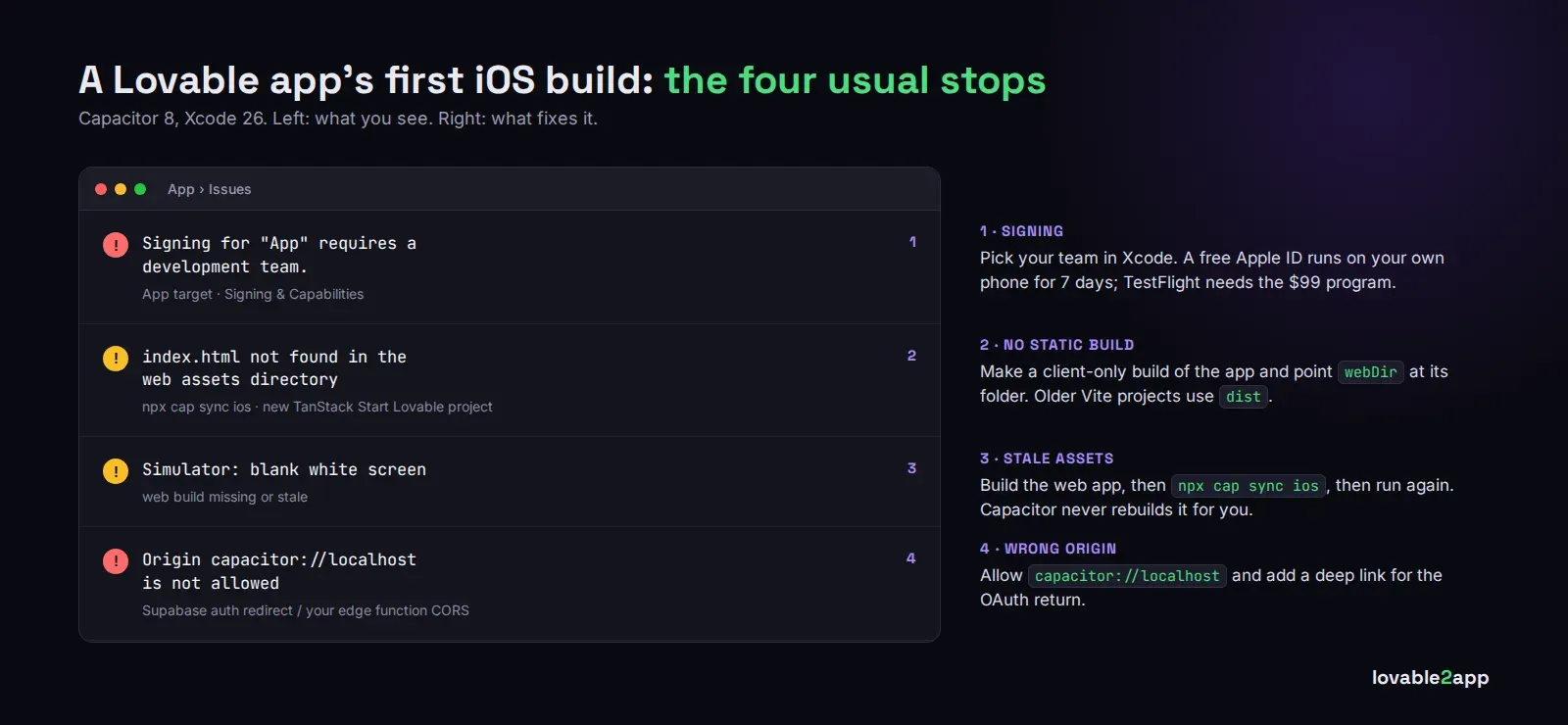
“Signing for App requires a development team.” Open the App target in Xcode, go to Signing & Capabilities, pick your team. With a free Apple ID you can run on your own phone, but the app stops launching after 7 days.
A white screen on the simulator. Nine times out of ten, the web build is missing or stale. Run your build, then npx cap sync ios, then run again. Capacitor doesn’t rebuild your web app for you.
API calls fail on the device but work in the browser. Your app now runs from capacitor://localhost, not your domain, so anything that checks the origin rejects it. Supabase auth redirect URLs and CORS rules on your own edge functions are the usual suspects. Add the Capacitor origin and a deep link for the OAuth return.
“pod install” errors. Usually an old CocoaPods or Ruby. Another reason we lean towards SPM.
After it runs
Running in the simulator is maybe a third of the job. Icons in every size, a splash screen, permission strings for the camera or location, push notifications, a reviewer login for App Review, and enough native behaviour that Apple sees an app rather than a website: that’s the rest, and it’s where first submissions usually stall.
If you’d rather skip to the end, we take Lovable apps to the App Store and Google Play as a fixed-price job, from $300, and keep the app building from the same code you edit in Lovable. The publishing service has the details.