Force an App Update in a Capacitor Lovable App
Here’s a problem nobody warns you about when your Lovable app goes into the App Store. You keep building in Lovable. Lovable renames a column, drops a table it no longer needs, or changes what an edge function expects. The website updates the moment you publish. The phones don’t. Somebody who installed version 1.0.3 in September is still running 1.0.3, and 1.0.3 is now asking Supabase for a column called display_name that became full_name on Tuesday.
That person sees a blank screen or a spinner that never stops. They don’t email you. They leave a one-star review that says “doesn’t load.”
You need two things: a way to tell an old build “you’re too old, update now”, and the discipline to not break old builds in the first place. Versions below are from npm on November 16, 2026.
Why the store version sticks around
A Capacitor app is your Lovable web build packed inside the native shell. When you ship 1.0.4 to the stores, every phone still has 1.0.3 until the store updates it. Automatic updates are on for most people, but not all, and not immediately. Some users have them off. Some phones haven’t been on wifi and power at the same time for a week. You’ll have three or four versions in the wild within a month of launch.
Live updates fix this for web-only changes, because the new web bundle downloads on next launch. But they don’t help once the change needs a new native build: a new plugin, a new permission, a Capacitor major upgrade. For those, the user has to visit the store. So you need a way to send them there.
The version check
The simplest setup that works on both platforms: keep the minimum supported version in your own database, and compare it on startup.
In Supabase, a one-row table is enough:
create table app_config (
  id int primary key default 1,
  min_ios_build int not null,
  min_android_build int not null
);
alter table app_config enable row level security;
create policy "anyone can read" on app_config for select using (true);
Then, before the app loads anything else:
import { App } from '@capacitor/app';
import { Capacitor } from '@capacitor/core';

export async function isTooOld() {
  if (!Capacitor.isNativePlatform()) return false;
  const { build } = await App.getInfo();
  const { data } = await supabase.from('app_config').select('*').single();
  if (!data) return false;
  const min = Capacitor.getPlatform() === 'ios' ? data.min_ios_build : data.min_android_build;
  return Number(build) < min;
}
App.getInfo() from @capacitor/app (8.1.2) gives you version (the 1.0.4 people see) and build (the integer that goes up with every upload). Compare builds, not version strings. String comparison says “1.0.10” is older than “1.0.9”, and someone will lose an afternoon to that.
Notice the if (!data) return false. If the config query fails, let the user in. A broken version check that locks everyone out is worse than the bug it was meant to prevent. Keep that table’s RLS policy dead simple, too, so it can’t fail for signed-out users.
When isTooOld() is true, show a full screen with one button: “Update”. No close button, no “later.” That’s what a forced update means.
Sending them to the store
The @capawesome/capacitor-app-update plugin (8.1.1, MIT, for Capacitor 8) does the store side.
import { AppUpdate, AppUpdateAvailability } from '@capawesome/capacitor-app-update';

async function update() {
  if (Capacitor.getPlatform() === 'android') {
    const info = await AppUpdate.getAppUpdateInfo();
    if (info.updateAvailability === AppUpdateAvailability.UPDATE_AVAILABLE && info.immediateUpdateAllowed) {
      return AppUpdate.performImmediateUpdate();
    }
  }
  await AppUpdate.openAppStore({ appId: '1234567890' });
}
On Android you get Google Play’s own in-app update screen, which downloads and installs without leaving the app. iOS has no such thing, so openAppStore() opens your App Store page and the user taps Update there. On iOS, pass appId, the number from your App Store URL.
The plugin can also tell you on its own whether a newer version exists in the store. On iOS that lookup is per country storefront (there’s a country option), and a version you released an hour ago may not show up yet. That’s one more reason we keep the minimum version in our own table: you decide when old builds get blocked, not the store’s cache.
One Android gotcha: in-app updates only work for apps installed from Google Play. A build you sideloaded for testing will say no update is available every time. Use Play’s internal app sharing to test the flow.
Don’t break old builds in the first place
The forced update is the safety net. The real fix is how you change the database while old versions are still out there.
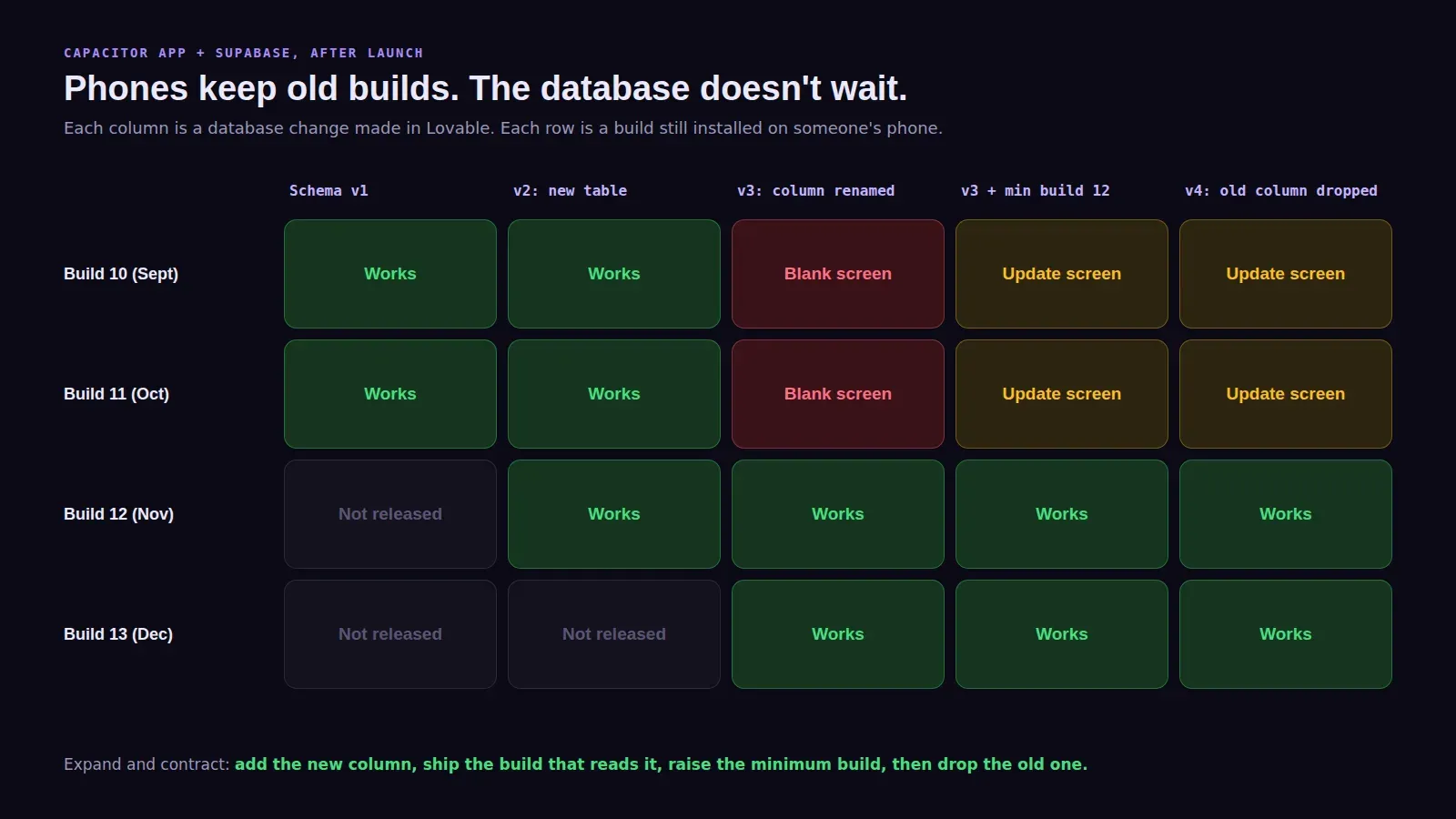
When you need to rename a column, don’t rename it. Add the new column, write to both, ship the app version that reads the new one, raise min_ios_build and min_android_build, and only then drop the old column. People call this expand and contract. It’s slower by a week and it never strands a user.
This is the part that bites Lovable apps hardest. You type “rename display name to full name” and Lovable writes a migration that does exactly that, instantly, on the live database. It’s the right change for the website. It’s a breaking change for every installed phone. Before you approve a migration in Lovable, ask one question: would build 1.0.3 still work against this? If the answer is no, add the column first and drop the old one later.
Edge functions have the same problem. If 1.0.3 sends { name } and the new function expects { fullName }, accept both for a while.
What we set up
Every app we take to the stores gets the version gate, the store button and a short checklist for schema changes after launch. It’s part of our Lovable app publishing service, from $300. Prices for all three tiers are on the pricing page.