Capacitor Biometric Login for a Lovable App: Face ID Done Right
Most Capacitor biometric tutorials stop at the part that looks good in a demo: tap a button, Face ID spins, a green checkmark. In a Lovable app that’s the least interesting part. Your users sign in with Supabase auth (Lovable Cloud runs on it too), so the real question is what Face ID actually unlocks. If the answer is “a boolean in JavaScript”, you’ve built a curtain, not a lock.
This is the setup we use in Capacitor apps built from Lovable projects, with versions checked on npm on November 15, 2026.
Pick the plugin by what it stores, not by its stars
There are two maintained options for Capacitor 8 (core 8.6.2 at the time of writing):
@capgo/capacitor-native-biometric8.9.3 (published November 11, 2026, peer@capacitor/core >=8.0.0, MPL-2.0). It shows the prompt and stores secrets in the iOS Keychain and Android Keystore, including items that can only be read after a successful biometric check.@aparajita/capacitor-biometric-auth10.0.0 (February 2026, MIT). Very good at the prompt and at explaining Android’s quirks, but it only authenticates. You’d need a second plugin for storage.
There’s also the old capacitor-native-biometric without a scope. Its last release was 4.2.2 in June 2023. Don’t install it into a Capacitor 8 project, however many Stack Overflow answers point at it.
For a Lovable app I’d pick the Capgo one, because the storage is the point. Its own README says the plain verifyIdentity() call “should not be used as the sole authentication mechanism”, since on a rooted or jailbroken phone a tool like Frida can hook the bridge and make it resolve. That’s honest of them, and it tells you how to design the flow.
What Face ID should unlock: a refresh token, never the password
The bad version, which I’ve seen in two projects this year: after login, save the user’s email and password with setCredentials(), then on the next launch call verifyIdentity(), read them back and call signInWithPassword. Now the password sits on the phone forever, it breaks the day they change it, and Google sign-in users have no password at all.
The better version stores the Supabase refresh token behind biometrics:
import { NativeBiometric, AccessControl } from '@capgo/capacitor-native-biometric';

await NativeBiometric.setData({
  key: 'sb-refresh',
  value: session.refresh_token,
  accessControl: AccessControl.BIOMETRY_CURRENT_SET,
});
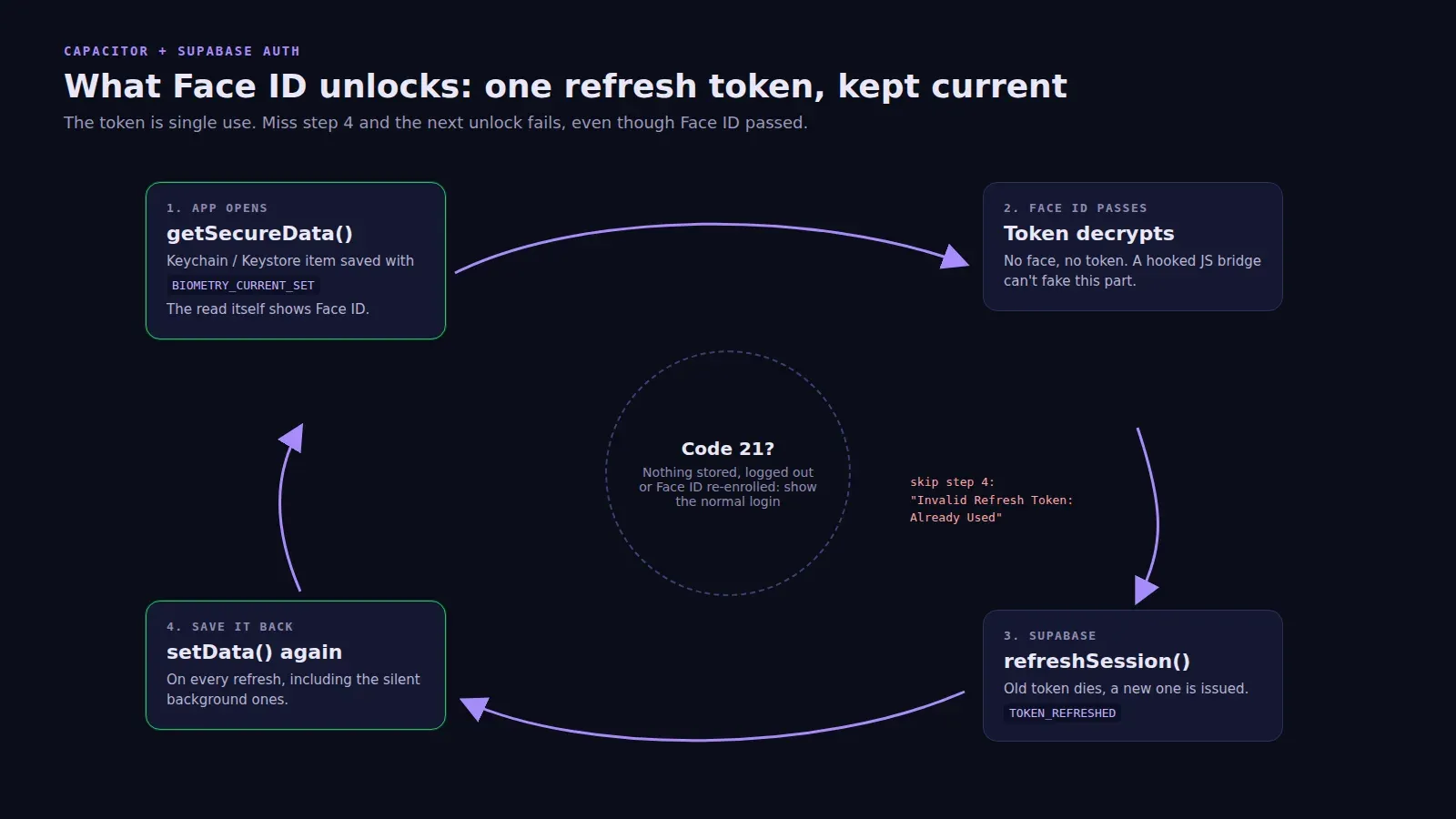
On the next launch you call getSecureData({ key: 'sb-refresh' }). That call is the biometric check: on iOS the system shows Face ID because the Keychain item demands it, and on Android BiometricPrompt runs with a CryptoObject bound to the decryption key. No separate verifyIdentity(), and nothing for a hooked bridge to fake, because without the face or finger the token never decrypts. Then supabase.auth.refreshSession({ refresh_token }) and you’re in.
BIOMETRY_CURRENT_SET versus BIOMETRY_ANY matters more than it looks. With the first, adding a new fingerprint or re-enrolling Face ID invalidates the item. Someone who learns your passcode can’t enrol their own face and walk in. I’d use it for anything with money or health data. It also means you must handle the item vanishing, which brings us to the error you’ll actually see.
Code 21 is not a bug
When there’s no protected item to read, getSecureData() rejects with code 21. The message is No protected data found on Android and No protected data found for key on iOS. The plugin docs call it “stable, expected”: fresh install, logged out, or the enrollment changed. Treat it as “show the normal login screen”, silently.
Don’t use isDataSaved() to decide whether to offer the Face ID button. It returns true for protected and unprotected items alike, so it can say yes and the read still throws 21. Just try the read and catch.
The other codes worth mapping to real UI: 16 is the user tapping Cancel (do nothing), 2 is a lockout after too many failures (send them to the password or magic link screen), and 3 means no biometrics are enrolled on the phone at all.
The refresh token trap
This one cost a client of ours a weekend. Supabase refresh tokens are single use. Every time supabase-js refreshes the session, which it does on its own in the background, the old token dies and a new one is issued. Their app saved the token into the Keychain once, at login. A day later the user opened the app, Face ID worked perfectly, and Supabase answered Invalid Refresh Token: Already Used. Users saw “Face ID failed” and blamed Apple.
The fix is one listener:
supabase.auth.onAuthStateChange(async (event, session) => {
  if (event === 'TOKEN_REFRESHED' && session) {
    await NativeBiometric.setData({ key: 'sb-refresh', value: session.refresh_token,
      accessControl: AccessControl.BIOMETRY_CURRENT_SET });
  }
  if (event === 'SIGNED_OUT') {
    await NativeBiometric.deleteData({ key: 'sb-refresh' }).catch(() => {});
  }
});
On iOS, saving a protected item doesn’t prompt; reading does. So this runs quietly. Also delete the item on sign-out, or the next person to pick up the phone gets the previous user’s session.
Platform setup that gets skipped
iOS: add NSFaceIDUsageDescription to Info.plist with a real sentence (“Unlock your account with Face ID”). Without it, as the aparajita README puts it, “the system won’t allow your app to use Face ID”. App Review reads that string too, so don’t leave Xcode’s placeholder in there.
Android: isAvailable() returns a biometryType, but on Android only trust isAvailable and strongBiometryIsAvailable. Plenty of phones report face unlock that apps aren’t allowed to use. A PIN is never counted as strong, even with useFallback: true.
The Lovable preview: the Capgo plugin ships web mocks, so the button won’t crash the browser preview. It also won’t prove anything there. Test on a real phone, and wrap the calls in a Capacitor.isNativePlatform() check so the web build of the same codebase keeps its normal login.
Finally, listen for biometryChange. It fires when the app comes back from the background, which is when someone has just turned Face ID off in Settings. Hide the button instead of letting them tap into an error.
If your app already uses secure storage for sessions, this sits on top of it rather than replacing it. And if you’d rather have someone wire this up while the rest of the app goes through review, it’s part of our publishing packages from $300, with the tiers on the pricing page.