Capacitor SQLite for a Lovable App: Offline Data
Capacitor SQLite gives your Lovable app a real database on the phone, so it keeps working with no signal and syncs with Supabase when the signal comes back. The plugin almost everyone uses is @capacitor-community/sqlite, version 8.1.1 (published August 6, 2026), built for Capacitor 8. You need it when the app has to read and write real records offline. You don’t need it to remember a login or a few settings.
Versions and quirks below are from the plugin’s README and npm, checked November 8, 2026.
Do you actually need it?
Most Lovable apps don’t. If you want the user to stay signed in, or to remember a theme and the last tab they opened, that’s key-value storage, and Capacitor Preferences does it in five lines.
SQLite earns its setup when people create records away from a connection. The clearest case we’ve built was a site-inspection app: inspectors in parking garages and basements filling in 30-question checklists with photos, two bars of signal at best. The Lovable version saved each answer straight to Supabase, and every lost request was a lost answer. One inspector redid a whole floor. After we moved it to SQLite with a sync step, the app stopped caring where it was. That rewrite took about four days, and most of it was the sync, not the database.
Install, and the part about encryption
npm install @capacitor-community/sqlite
npx cap sync
The README carries a warning that’s easy to scroll past. The plugin ships with SQLCipher, “even for unencrypted databases”, and SQLCipher falls under US encryption export rules. When you upload to App Store Connect it asks whether the app uses encryption, and Apple explains the answers on its page about complying with encryption export regulations. The README adds that you “may” need to file a year-end self-classification report. Read the SQLCipher note linked from the README and decide before you submit, not while App Store Connect is waiting for an answer.
If you do want the database encrypted on the device, the plugin has iosIsEncryption and androidIsEncryption in capacitor.config.ts, plus setEncryptionSecret to set the passphrase. None of the encryption methods work on the web.
The web build is the one Lovable shows you
Here’s the catch for Lovable specifically. Lovable’s preview runs your app in a browser, and in a browser there’s no native SQLite. The plugin falls back to jeep-sqlite, which runs SQLite compiled to WebAssembly (sql.js) and stores the database in IndexedDB.
That works, with two chores. You install jeep-sqlite and sql.js, and you copy sql-wasm.wasm from node_modules/sql.js/dist/ into public/assets/ (the README’s step for React and Vue apps). Forget the copy and the preview throws on the first query, while the phone build is fine, which is a confusing afternoon. And on the web the data lives in that browser’s IndexedDB, so clearing site data wipes it. There’s a Chrome DevTools extension, Jeep SQLite Browser, for looking inside it.
So you test the logic in the Lovable preview, and you test the storage on a phone. Both, every time.
Android settings the README asks for
The README’s Android section asks for three things a fresh npx cap add android project doesn’t have:
android:allowBackup="false"andandroid:fullBackupContent="false"inAndroidManifest.xml- a
res/xml/data_extraction_rules.xmlthat excludes thedatabasedomain (and the others) from cloud backup and device transfer - a
packagingOptions { exclude 'build-data.properties' }block if Android Studio complains about duplicatebuild-data.propertiesfiles
The README still lists minSdkVersion = 23 and SDK 35. A Capacitor 8 project already uses higher numbers (Capacitor’s Android docs list API 24 as the minimum), so keep yours. The backup rule has a consequence worth saying out loud: when a user moves to a new phone, the local database doesn’t come with them. That’s fine only if Supabase holds the real copy.
Supabase stays the source of truth
Don’t treat SQLite as a second database you hope stays in step. Treat it as a cache with a queue of local edits.
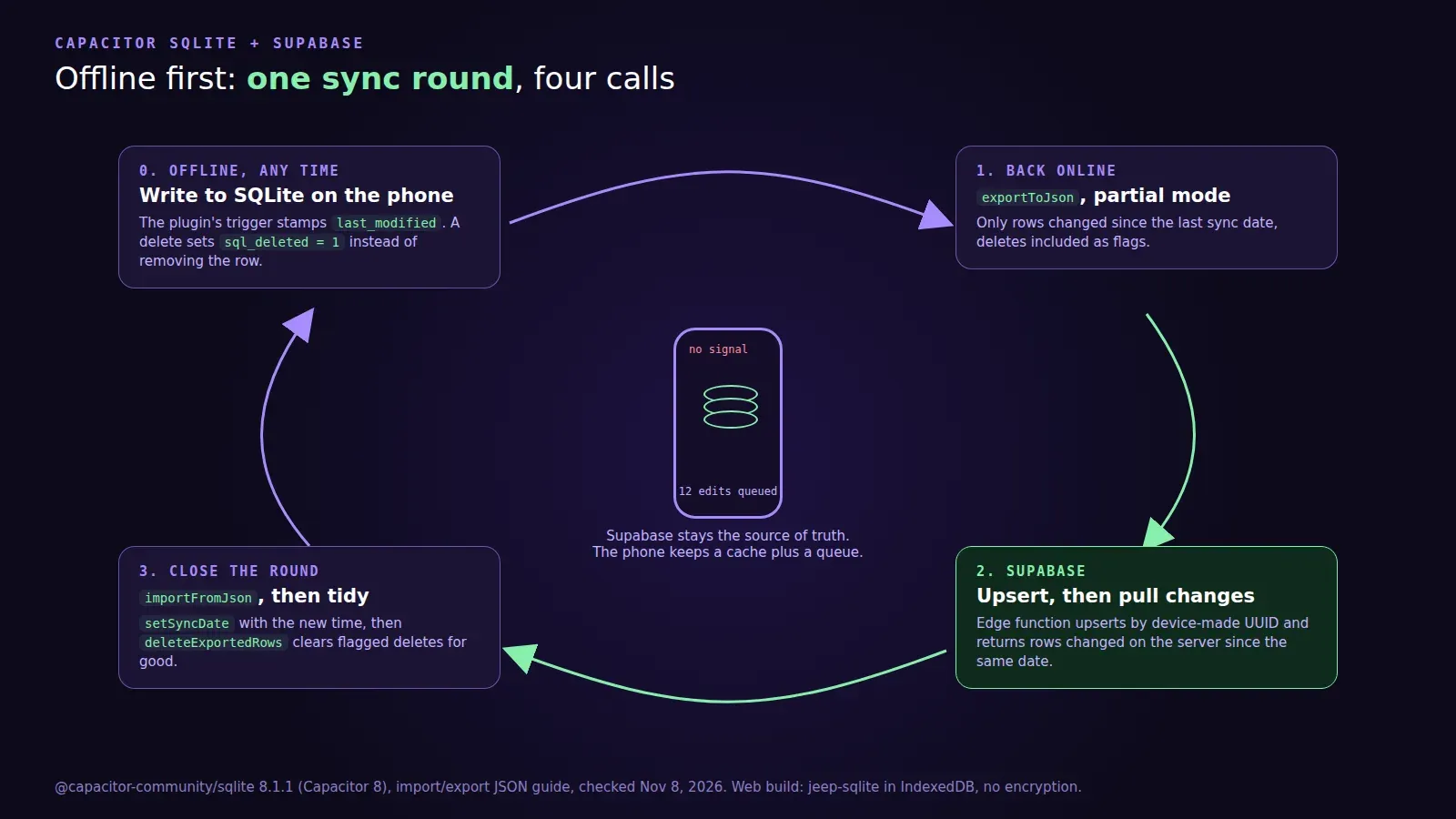
The plugin has the pieces built in, documented in its import and export JSON guide. Give every table a last_modified column and the plugin adds a trigger that stamps each change. Add an sql_deleted column (0 or 1), so a delete becomes a flag the server can see instead of a row that silently disappears. Then one sync round is:
exportToJsonin partial mode gives you every row changed since the last sync, deleted ones flagged.- Send those to Supabase (an upsert through an edge function is simplest), and ask for every row that changed on the server since the same date.
importFromJsonthe server’s rows in partial mode. Rows withsql_deleted: 1get removed locally.setSyncDatewith the new time, thendeleteExportedRowsto clear the flagged deletes for good.
Two rules save you pain. Use UUIDs made on the device, never server-generated integer ids, or two offline phones will both create row 418. And decide what wins when the same record changed on both sides. “Last write wins on last_modified” is fine for checklists; it’s wrong for anything like stock counts, where you want the server to apply the change, not overwrite the number.
Schema changes later go through addUpgradeStatement with a version number, so an app that’s been offline for a month still upgrades its tables in order on the next launch.
If your Lovable app needs to work offline and you’d rather not spend four days on the sync, we publish Lovable apps to the App Store and Google Play from $300 for up to 5 screens, and offline data is one of the native features we add. The pricing page has what each package includes.