PWABuilder for a Lovable App: What It Really Ships
PWABuilder is Microsoft’s free tool that takes a published PWA and wraps it into store packages: Google Play, the Microsoft Store, Meta Quest and, experimentally, the iOS App Store. You paste your URL, click Package for stores, and download a zip. For a Lovable app that’s a tempting shortcut, and on Android it mostly works. On iPhone it’s a coin toss, and the coin is weighted against you.
We went through PWABuilder’s own docs on October 28, 2026. Here’s what you actually get, and where Lovable apps trip.
First, your Lovable app has to be a PWA
PWABuilder doesn’t make a PWA. It packages one. A fresh Lovable project has no web manifest and no service worker, so PWABuilder’s report card will flag it straight away and the package options stay greyed out or half-filled.
The fix is small: ask Lovable to add vite-plugin-pwa, a manifest.webmanifest with your name, theme_color, background_color and icons at 192 and 512 pixels (add a maskable one too, Android uses it for round icons), then publish. Our PWA vs native app post covers that part and what a PWA can and can’t do on iPhone.
Use your custom domain, not yourapp.lovable.app. The Android step below needs you to serve a file from the root of the domain the app runs on, and you want that domain to be one you’ll still own in three years.
Google Play: what’s in the zip
On Android, PWABuilder uses Google’s Bubblewrap to build a Trusted Web Activity. In plain words, a tiny Android app that opens your site in Chrome with the browser bar hidden. It’s not a WebView, it’s real Chrome, so your login cookies, Stripe checkout and service worker behave exactly like they do on the web. Packages need Android 7.0 or newer.
The zip has four things that matter:
- an
.aabfile, which is what you upload to the Play Console assetlinks.json, the file that proves the app and the website belong togethersigning.keystoreandsigning-key-info.txt, your upload key and its passwords- optionally the Android source, if you ticked Include source code
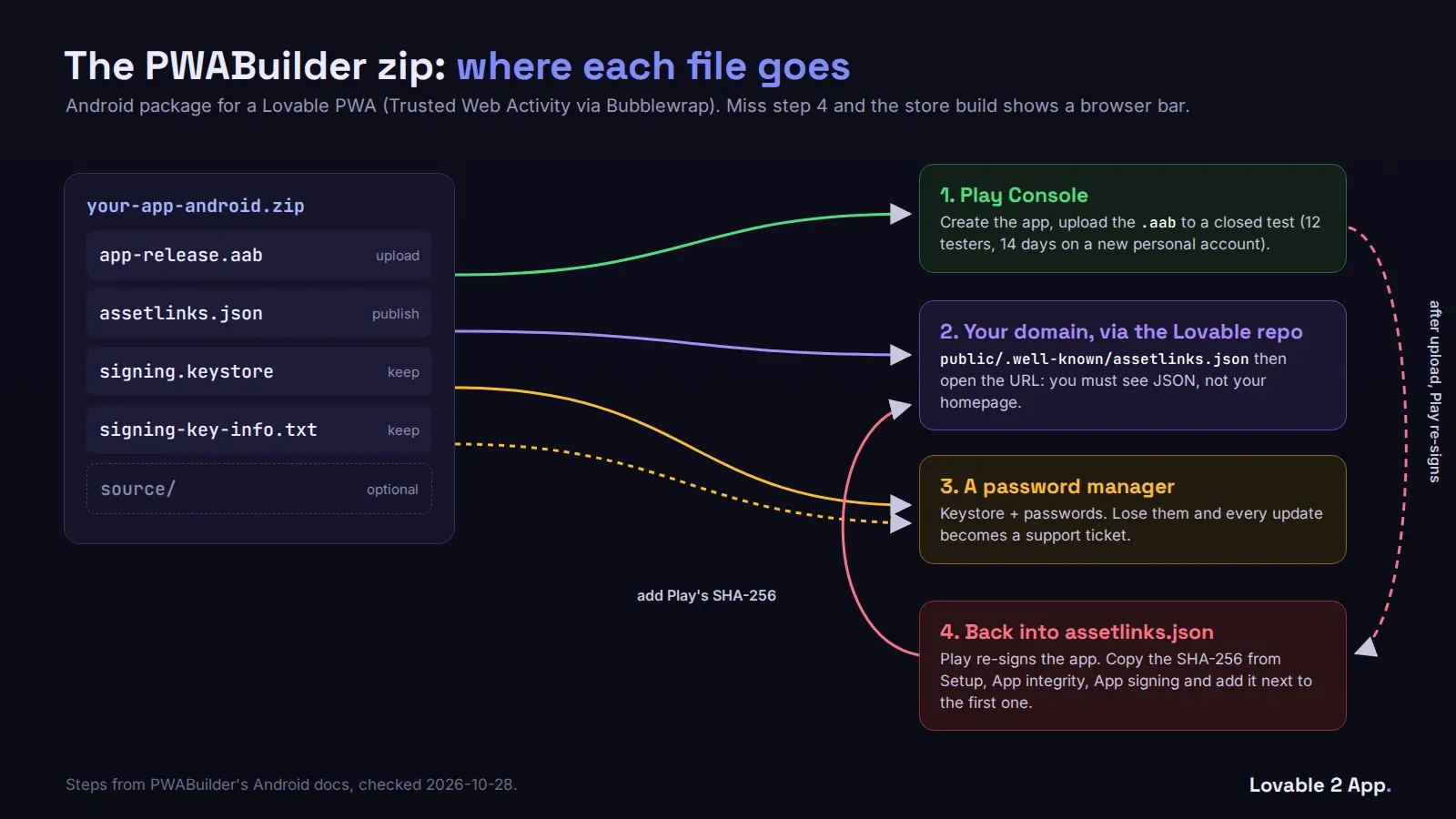
There are a few switches worth knowing before you click Download. Notification delegation lets your web push work without Chrome’s permission prompt. Location delegation does the same for geolocation. Google Play billing turns on the Digital Goods API if you sell subscriptions inside the app.
The assetlinks.json step that breaks everything
This is the one we see go wrong most. If the file is missing or wrong, your “app” opens with a Chrome address bar across the top, which looks broken, or it crashes on launch.
The file has to be at https://yourdomain.com/.well-known/assetlinks.json. In a Lovable project that means public/.well-known/assetlinks.json in the repo. After you publish, open that URL in a browser. If you see your app’s homepage instead of JSON, your host is serving the single-page-app fallback for that path, and Android will treat it as missing.
Then the trap. Google Play re-signs your app with its own key after you upload the .aab. The fingerprint in PWABuilder’s assetlinks.json is your upload key, not Google’s. So the build you tested works, and the build people download from the store shows the address bar. Go to Play Console, Setup, App integrity, App signing, copy the SHA-256 fingerprint there and add it to sha256_cert_fingerprints in the file next to the first one. Publish again. We had a founder whose app had been live for nine days with a browser bar on every screen and 1.8 stars before anyone told him why.
Keep the keystore and its text file somewhere you won’t lose them. A password manager is fine. Without them, an update is a support ticket with Google.
Two more Play rules that have nothing to do with PWABuilder. PWABuilder’s docs say a PWA package can’t target children, so set the target audience to 13 and over. And a personal developer account made after November 13, 2023 has to run a closed test with 12 testers for 14 days before it can go to production (Google’s testing requirements). That’s the slow part, not the packaging.
iOS: experimental, and Apple decides
PWABuilder’s iOS package is a Swift project with a WebView that loads your site. You need a Mac with Xcode, pod install, the $99 Apple developer account, and you build and submit it yourself. PWABuilder’s docs label it Experimental and say acceptance depends on your PWA’s UI and on native features like push and in-app purchase.
That’s Apple’s guideline 4.2 in polite words. A WebView that loads your live website, with nothing native added, is the most common rejection we see for Lovable apps. The PWABuilder shell doesn’t add push or anything else on its own, and it isn’t the Capacitor setup most Lovable-to-iOS guides assume, so you’d be adding native code to a Swift project instead of using plugins.
Our opinion: use PWABuilder for Google Play if your app already works well as a PWA and you’re fine with Chrome rendering it. It’s a good afternoon’s work. For iPhone, don’t. Build it with Capacitor, bundle the web code inside the app and add at least push notifications, and you’ll be submitting something Apple has a reason to approve.
If you want the iOS side done properly, or both stores at once, see what we charge to publish a Lovable app. And if Apple already said no, the App Store rejection fix is $350 flat.