Capacitor Haptics in a Lovable App: Taps That Feel Native
Capacitor Haptics is the small plugin that makes a phone tap back when you press something: the light knock when a toggle flips, the double pulse when a payment goes through. A Lovable app wrapped in Capacitor has none of that by default, and it’s one of the reasons a wrapped app feels like a website in a frame. It takes about twenty minutes to add, and most of that time goes on deciding where not to put it.
We checked everything below on November 12, 2026. The current release is @capacitor/haptics 8.0.2 (published March 27, 2026), which needs @capacitor/core 8. Capacitor itself is on 8.6.0.
npm install @capacitor/haptics
npx cap sync
No setup in Xcode. On Android the plugin’s own manifest adds android.permission.VIBRATE, which is a normal permission, so there’s no prompt.
Three kinds of feedback, and one you should mostly skip
The API has four parts, and the names come straight from Apple’s UIKit classes, which tells you how to think about them.
Haptics.impact({ style }) is a single knock: Light, Medium or Heavy. Use it when something physical-looking happens on screen, a card snapping into place, a button that commits an action. Haptics.notification({ type }) is a short pattern for an outcome: Success, Warning or Error. Use it once at the end of something, like a saved form or a failed card. The selection trio, selectionStart(), selectionChanged() and selectionEnd(), is the tick you feel scrolling a date picker. Call start when the finger goes down, changed on every step, end when it lifts. Calling selectionChanged() without a start does nothing at all, on both platforms, and that is the bug we see most: someone wires it to a slider’s onChange, never calls start, and decides haptics are broken.
Then there’s Haptics.vibrate({ duration }), a plain buzz, 300 ms by default. Skip it for UI. It’s for alarms and incoming calls, and a 300 ms buzz on a button press feels like the phone is complaining.
One default to watch: impact() with no options is Heavy. The README’s example always passes a style, Lovable’s generated code often doesn’t, and Heavy on every tap gets old in about a minute.
Same call, different feel on Android
On iOS the plugin hands everything to Apple’s feedback generators (UIImpactFeedbackGenerator, UINotificationFeedbackGenerator, UISelectionFeedbackGenerator), so the taps feel exactly like the rest of iOS. They also respect the user’s System Haptics switch in Settings, which is what you want.
Android has no such generators in the plugin. It plays fixed waveforms through the Vibrator service, and you can read them in the plugin source. A Light impact is 50 ms at amplitude 110 out of 255. Heavy is 60 ms at 255. A selection tick is 100 ms at amplitude 100, which is long for a tick: on a lot of mid-range Android phones a date picker with selection feedback feels buzzy rather than crisp. Warning is written as six segments, but every one is at amplitude 255, so what you feel is one solid 210 ms buzz.
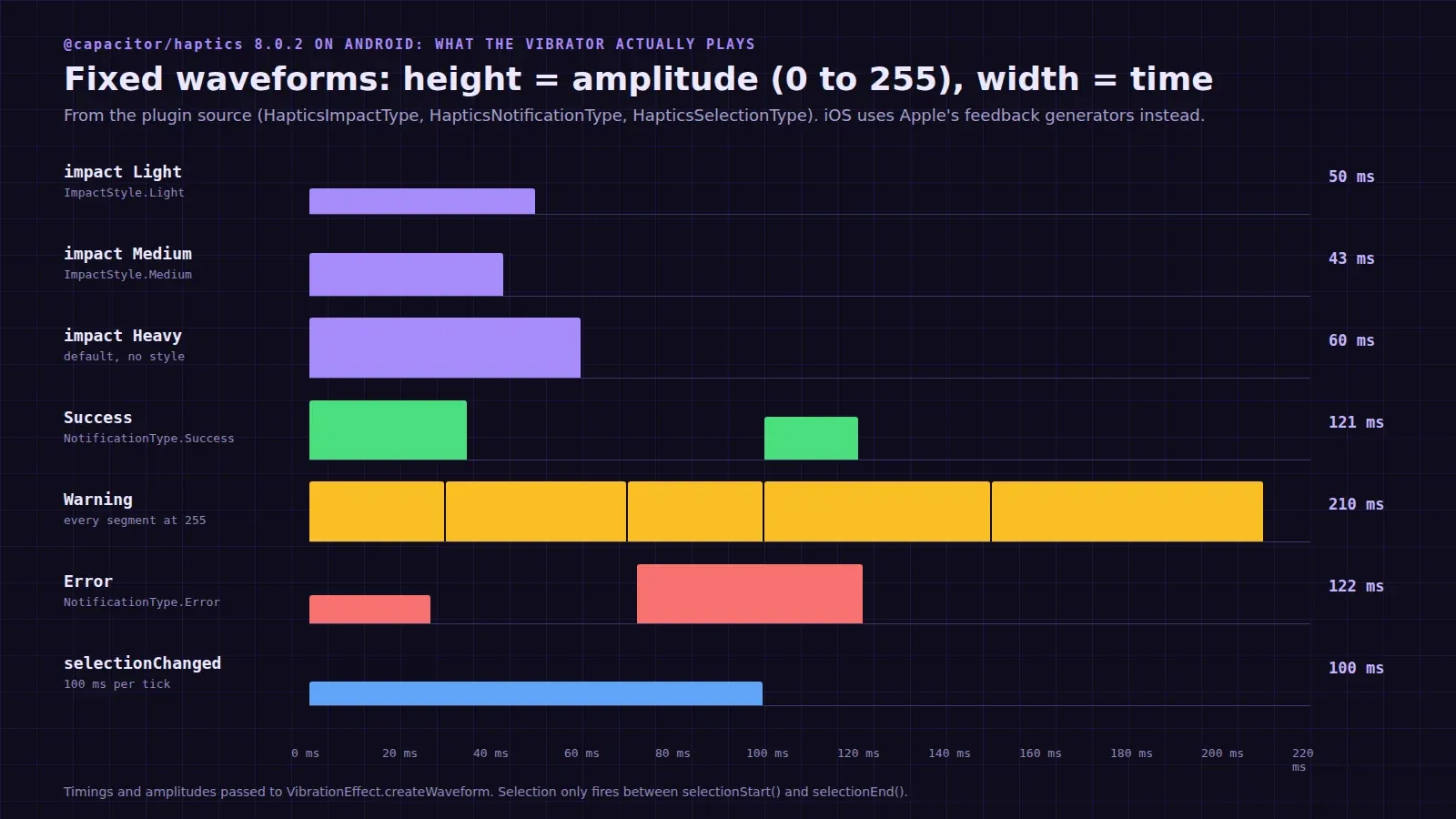
Our rule from this: on Android, use impacts and notifications, and leave selection feedback off unless you’ve felt it on a cheap phone and liked it. A quick Capacitor.getPlatform() === 'ios' check around the selection calls is fine. It’s a little hacky and we’d ship it.
The web preview throws
This one catches every Lovable app, because the Lovable preview is a browser. On the web, the plugin falls back to navigator.vibrate. Chrome on Android has it. Safari, on iPhone and on the Mac, does not, and the plugin then throws “Browser does not support the vibrate API”. So the founder clicks a button in the Lovable preview on a MacBook, the promise rejects, and if the haptic call sits before the real work in the handler, the real work never runs.
Put haptics in one helper and never let it throw:
import { Capacitor } from '@capacitor/core';
import { Haptics, ImpactStyle, NotificationType } from '@capacitor/haptics';

const native = Capacitor.isNativePlatform();

export const tap = (style = ImpactStyle.Light) =>
  native ? Haptics.impact({ style }).catch(() => {}) : Promise.resolve();

export const done = (type = NotificationType.Success) =>
  native ? Haptics.notification({ type }).catch(() => {}) : Promise.resolve();
And don’t await it before the thing the user asked for. Fire it and carry on. A haptic that lands 20 ms late is fine, a checkout that waits on one is not.
We had an app come to us where haptics were called inside a list’s render loop, so every scroll that re-rendered a row fired an impact. On an iPhone 15 it felt like holding an electric toothbrush. One useEffect with the wrong dependency array. If you add haptics, add them to event handlers only.
Where it helps, and what it won’t do for review
Good places: a pull-to-refresh that triggers, a toggle, adding to cart, a swipe-to-delete that commits, the success screen after payment, a form error. Bad places: every button, every link, every keystroke, page navigation.
About App Store review, since founders ask. Haptics make an app feel native, and Apple’s reviewers do notice an app that feels like a website. But haptics on their own won’t get a wrapped app past guideline 4.2. Reviewers look for things a website can’t do: push notifications, the camera, offline data, the native share sheet. Haptics are the polish on top of those, not one of them. Our post on Apple’s 4.2 rejection has the list we work through, and the share sheet guide covers another small plugin with a web fallback that misbehaves.
If you’d rather we add the native features and ship it, publishing a Lovable app to both stores starts at $300 for up to 5 screens, with the tiers on our pricing page.