Capacitor Share: The Native Share Sheet in a Lovable App
Capacitor Share is the plugin that opens the phone’s real share sheet from your app: the iOS one with AirDrop and Messages along the top, the Android one with your recent contacts. If your Lovable app has a Share button, you need it, and the reason is a bit embarrassing for the web platform.
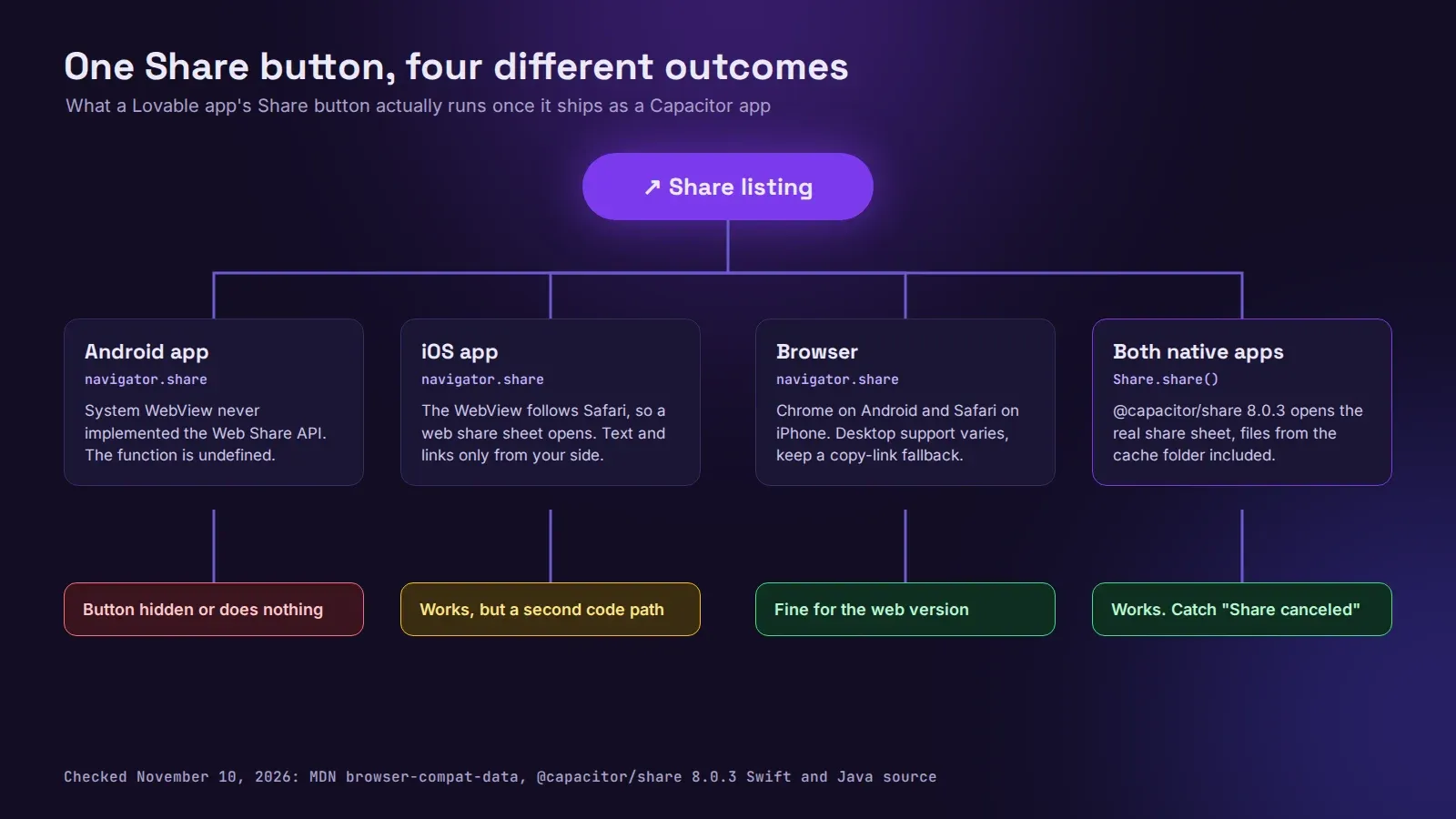
Your Lovable app almost certainly calls navigator.share(). That’s the Web Share API, it works in Chrome on Android and in Safari on iPhone, and in the browser preview everything looks fine. Wrap the same app with Capacitor and the Android build runs inside Android’s System WebView, which has never implemented it. MDN’s compatibility data lists WebView Android as “No”, with an open Chromium bug. navigator.share is simply undefined there. Lovable’s generated code usually checks for it and hides the button, or falls back to copying the link, so nobody notices until a tester asks where the Share button went.
iOS is kinder. The WebView inside a Capacitor iOS app follows Safari and does have navigator.share. But you get a web share sheet with no files from the native side, and you now have two code paths that behave differently on two platforms. Use the plugin on both.
Install it
We checked this on November 10, 2026. The current release is @capacitor/share 8.0.3, published October 2, for Capacitor 8.
npm install @capacitor/share
npx cap sync
No permissions, nothing to add to Info.plist for plain text and links. That’s rare for a native feature and a nice change from the microphone or camera.
The code
Keep the web path for the browser version of your app and use the plugin inside the native builds:
import { Capacitor } from '@capacitor/core';
import { Share } from '@capacitor/share';

export async function shareListing(title: string, url: string) {
  if (Capacitor.isNativePlatform()) {
    try {
      await Share.share({ title, text: title, url, dialogTitle: 'Share listing' });
    } catch (e: any) {
      if (e?.message !== 'Share canceled') throw e;
    }
    return;
  }
  if (navigator.share) return navigator.share({ title, url });
  await navigator.clipboard.writeText(url);
}
That catch matters. When someone opens the sheet and swipes it away, the plugin doesn’t resolve with nothing. It rejects, with the message Share canceled, on both iOS and Android (we read it in the plugin’s Swift and Java source). Lovable apps often wrap every async call in a toast that says “Something went wrong”, so a user who changed their mind gets an error message. We had a marketplace client whose Sentry was full of these: about 900 “errors” in the first week after launch, every one of them a person closing a share sheet.
A few other details from the source that the docs page doesn’t spell out:
titlebecomes the email subject on iOS.dialogTitleis the heading of the Android chooser and is ignored on iOS.- On Android, if you pass both
textand an httpurl, the plugin joins them into one string, text then a space then the link. So don’t put the link insidetextas well, or WhatsApp gets it twice. urlmust behttp,httpsorfile://. Adata:orblob:URL is rejected on Android withUnsupported url.- Calling
shareagain while a sheet is open rejects withCan't share while sharing is in progress. Double-taps do this. Disable the button until the promise settles. - The result has
activityType, the app that received the share on iOS, and it can be an empty string. Don’t build analytics on it.
Sharing files and images
This is where most Lovable apps get stuck. Say the app makes a receipt PDF or a picture with a canvas, and you have it as a base64 string or a blob: URL. Neither can go to the share sheet. You write the file to disk first and pass its file:// path:
import { Filesystem, Directory } from '@capacitor/filesystem';

const { uri } = await Filesystem.writeFile({
  path: `share/receipt-${orderId}.pdf`,
  data: base64Pdf,
  directory: Directory.Cache,
  recursive: true,
});
await Share.share({ title: 'Your receipt', files: [uri] });
Use Directory.Cache, not Documents. On Android the plugin hands the file to other apps through a FileProvider, and by default that provider only covers the cache folder. Anything else needs its path added in android/app/src/main/res/xml/file_paths.xml, and the error you get otherwise is not friendly. Cache is also the right place for something the user shares once: the OS can clear it, and you can delete the file after the promise resolves. Our Capacitor Filesystem guide covers the folders in more detail.
One iOS trap with images: the share sheet offers “Save Image”, and if your Info.plist has no NSPhotoLibraryAddUsageDescription, iOS kills the app the moment someone taps it. Add the key with a real sentence (“Saves the photos you choose to your library”) before you ship image sharing.
files works on iOS and Android only. The web version of the plugin calls navigator.share with title, text and url, and drops files.
Does Apple care?
Not directly. A share button won’t get you through review on its own, but native share, push notifications and real offline behaviour are the kind of things that make a Capacitor app feel like an app rather than a website in a frame, which is the whole point of guideline 4.2. It’s twenty minutes of work. Do it.
If you’d rather have this and the rest of the native polish done for you, we publish Lovable apps to the App Store and Google Play from $300 for up to 5 screens, tested on real iPhones and Android phones. The pricing page shows what each package includes.