Capacitor InAppBrowser for a Lovable App
Capacitor InAppBrowser is the plugin you reach for when a link in your app has to open a web page without dropping the user out of the app: a help centre, a terms page, a Stripe customer portal, an OAuth screen. It’s @capacitor/inappbrowser, and on November 14, 2026 the current release is 4.1.0, published October 15, for Capacitor 8 (the version number doesn’t follow Capacitor’s, which confuses people on npm).
In a Lovable app, every external link is an <a href> or a window.open(). In the browser preview that opens a tab and nobody thinks twice. Inside a Capacitor shell it either loads the page inside your app’s own WebView, replacing your app with no way back, or does nothing at all. The first time a tester taps “Terms of Service” and gets stuck on your lawyer’s page with no back button, you’ll understand why this plugin exists.
Three ways to open a URL
The plugin has three methods, and picking the wrong one is the most common mistake we fix:
openInExternalBrowser({ url })hands the link to Safari or Chrome. The user leaves your app. Fine for “view on our website” links, wrong for anything they should come back from.openInSystemBrowser({ url, options })opens SFSafariViewController on iOS and a Custom Tab on Android. It looks like the real browser, slides over your app, and has a Done button. You can’t inject anything or read the URL. This is the right default for terms pages, docs and checkout.openInWebView({ url, options })opens the plugin’s own WebView with a toolbar you configure: URL bar on or off, close button text, toolbar at the top or bottom, back and forward buttons, a custom user agent and custom headers. It’s the only mode that tells you which page the user is on.
import { Capacitor } from '@capacitor/core';
import { InAppBrowser, DefaultSystemBrowserOptions } from '@capacitor/inappbrowser';

export async function openLink(url: string) {
  if (!Capacitor.isNativePlatform()) {
    window.open(url, '_blank', 'noopener');
    return;
  }
  await InAppBrowser.openInSystemBrowser({ url, options: DefaultSystemBrowserOptions });
}
That isNativePlatform() check isn’t optional. The plugin supports iOS and Android only, and every method’s web implementation throws Not implemented on web. So without the guard your links break in the Lovable preview, which is where you’ll be testing most of the time. Put this helper in one file and tell Lovable to use it for every external link, or it will keep generating plain <a target="_blank">.
Install it, and the minSdk surprise
npm install @capacitor/inappbrowser
npx cap sync
On Android it needs minSdkVersion = 26 in android/variables.gradle. A fresh Capacitor 8 project ships with 24, so the first build fails until you change it. API 26 is Android 8.0; nobody you sell to is on 7 anymore, just change it. On iOS the Swift package declares iOS 15.
Cookies don’t follow you in
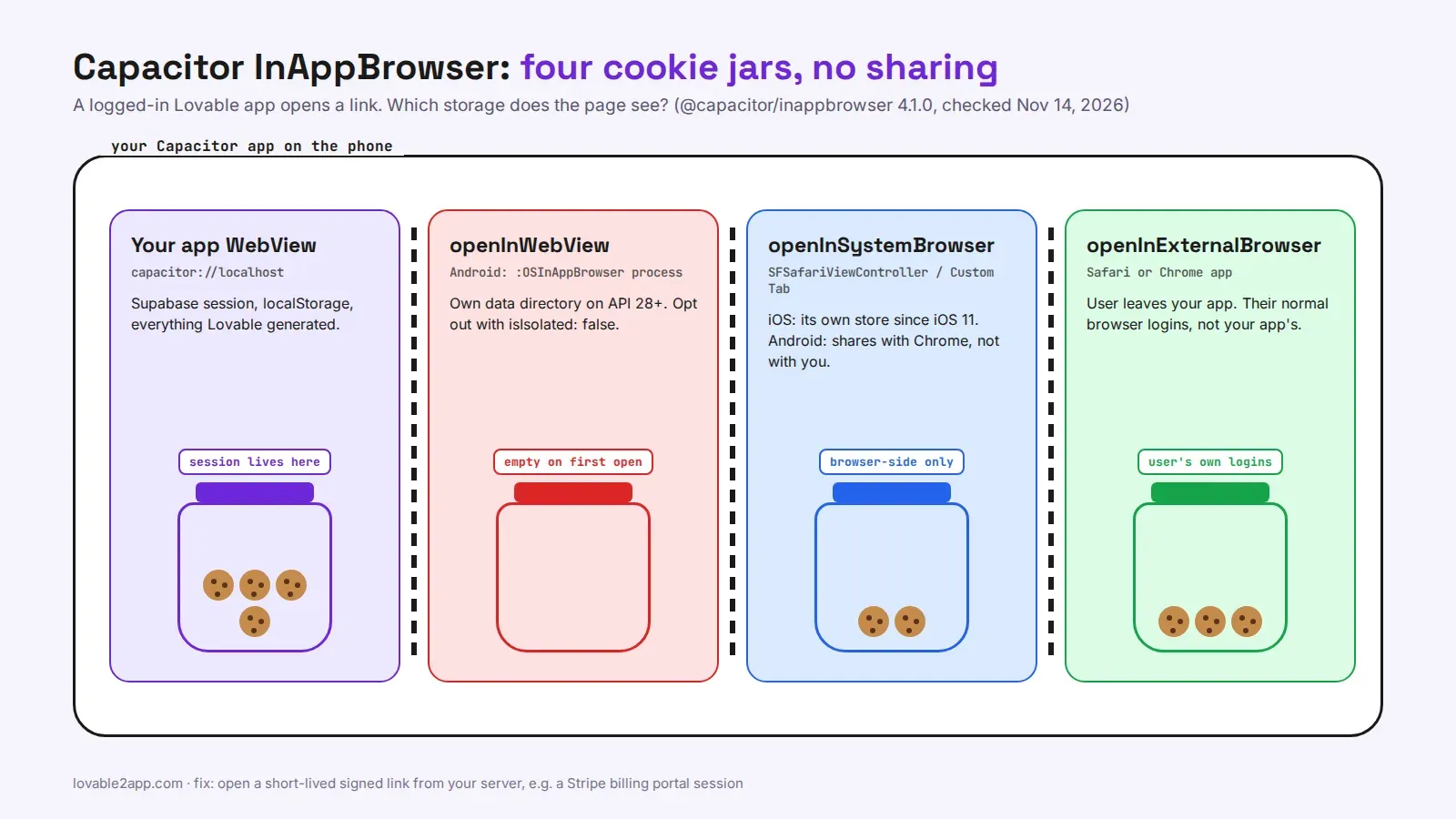
This is the bit that bites Lovable apps. Your user is logged in to your app through Supabase, and the session lives in your app’s WebView storage. None of the three modes sees it.
openInWebView on Android (API 28 and up) runs in a separate process called :OSInAppBrowser with its own data directory, so its localStorage and cookies are isolated from your app by default. The README calls this out as a breaking change: anyone upgrading loses whatever the in-app browser had stored and has to log in to those sites again. You can opt out with android: { isIsolated: false }, but only do it if you really need to share a session, because the isolation is the point when you’re loading pages you don’t control.
The system browser views don’t share with your app either. Custom Tabs use Chrome’s cookies. SFSafariViewController has kept its own store, separate from Safari, since iOS 11.
So “open the customer portal and they’re already logged in” doesn’t happen by magic. Generate a short-lived link on your server (Stripe’s billing portal sessions work exactly like this) and open that. We had a founder whose “Manage subscription” button opened their own web dashboard in the in-app browser, which showed a login screen to people who had just logged in. Three support emails in the first morning. The fix was a Supabase edge function that created a Stripe portal session and returned its URL.
Knowing when the user is done
Listeners:
await InAppBrowser.addListener('browserClosed', () => refreshSubscription());
await InAppBrowser.addListener('browserPageNavigationCompleted', ({ url }) => {
  if (url?.startsWith('https://yourapp.com/checkout/success')) InAppBrowser.close();
});
browserClosed and browserPageLoaded fire for the WebView and the system browser. browserPageNavigationCompleted, the one with the URL, only fires for openInWebView. On Android there’s also successUrlPatterns, a list of regexes that closes the WebView natively when a matching page finishes loading, even if your JavaScript is busy. Use it for payment or form flows that end on a known URL.
For anything inside the system browser, refresh state on browserClosed instead. You won’t get the URL, and that’s by design.
Not for Google sign-in
Don’t open Google’s OAuth page in openInWebView. Google blocks sign-in inside embedded WebViews with 403 disallowed_useragent, and the plugin’s WebView counts as embedded. For login use the system browser route with a deep link back, which I walked through in Google Sign-In in a Capacitor Lovable app, and set up the return URL first with Capacitor deep links.
Do you still need @capacitor/browser?
The older @capacitor/browser (8.0.5) does one thing, the system browser view, and on web it falls back to window.open on its own. If that’s all your app does, it’s lighter and fine. Pick InAppBrowser when you need the configurable WebView, the navigation event or the Android auto-close. Don’t install both for the same job.
If you’d rather have the links, deep links, payments and the rest of the native work done properly, we turn Lovable apps into App Store and Google Play apps from $300 for up to 5 screens. The pricing page has the three packages.