Capacitor Microphone for a Lovable App
Capacitor microphone access in a Lovable app works two ways. You can keep the browser code Lovable already wrote (getUserMedia and MediaRecorder), which runs inside the Capacitor WebView once the native permission entries are in place. Or you can record natively with a plugin, which gives you files in a predictable format and survives phone calls. For voice notes longer than a minute, use the plugin.
Versions below are from npm and each plugin’s README, and the Android behaviour from the @capacitor/android 8.6.0 source, checked November 9, 2026.
The crash that comes first
We had a physio clinic’s voice-notes app go to TestFlight last spring. It recorded perfectly in the Lovable preview. On the iPhone it closed the moment the therapist tapped the mic button. No error screen, just gone. The crash log said the app “attempted to access privacy-sensitive data without a usage description”.
iOS kills any app that touches the microphone without an NSMicrophoneUsageDescription entry in Info.plist. The app already had a camera string from a barcode feature, so everyone assumed permissions were done. They weren’t. This is the first thing to add, before any code:
<key>NSMicrophoneUsageDescription</key>
<string>Record voice notes for your session, saved to your account.</string>
Write a real sentence. The example string in most plugin READMEs (“This app uses the microphone to record audio”) says nothing about why, and vague purpose strings are a routine App Review complaint.
On Android, declare it in AndroidManifest.xml:
<uses-permission android:name="android.permission.RECORD_AUDIO" />
<uses-permission android:name="android.permission.MODIFY_AUDIO_SETTINGS" />
Route 1: keep the web code
If your Lovable app already records with navigator.mediaDevices.getUserMedia({ audio: true }), it can keep doing that. On Android, Capacitor’s BridgeWebChromeClient catches the WebView’s audio capture request and asks the user for RECORD_AUDIO and MODIFY_AUDIO_SETTINGS itself, which is why both lines above need to be in the manifest. On iOS, WKWebView shows its own prompt, using your usage string.
It’s the cheapest route, and for short clips (a 10-second voice search, a quick reply) we’d leave it alone. Where it hurts:
- The format depends on the engine. Chrome-based WebViews tend to give you WebM with Opus, WKWebView gives MP4/AAC, and a file recorded on one isn’t always playable on the other.
- Some Safari and WKWebView versions report a
MediaRecordertype as supported and then can’t play back what they recorded. - A phone call in the middle just ends the stream. You find out when the blob is shorter than expected.
- The recording lives in memory until you upload it. Fine for 20 seconds, bad for a 40-minute lecture.
Route 2: a native recorder plugin
There’s no official @capacitor/ microphone plugin. The one most tutorials name, capacitor-voice-recorder, stopped at version 7.0.6 in June 2025 and only claims Capacitor 7. Two maintained ones support Capacitor 8:
@independo/capacitor-voice-recorder 8.3.13 (published November 8, 2026) is a rewrite of that old plugin. It needs Capacitor 8, iOS 15 and Android minSdk 24, and builds with Java 21. You get requestAudioRecordingPermission(), startRecording(), pause and resume, getCurrentAmplitude() for a level meter, and interruption events. Android returns audio/aac, iOS returns audio/mp4 in an M4A container.
@capgo/capacitor-audio-recorder 8.3.5 (October 18, 2026) covers the same ground with a cancelRecording() and configurable bitrates and sample rates.
We use the Independo one on most builds, mainly for how it handles interruptions.
Phone calls and other apps
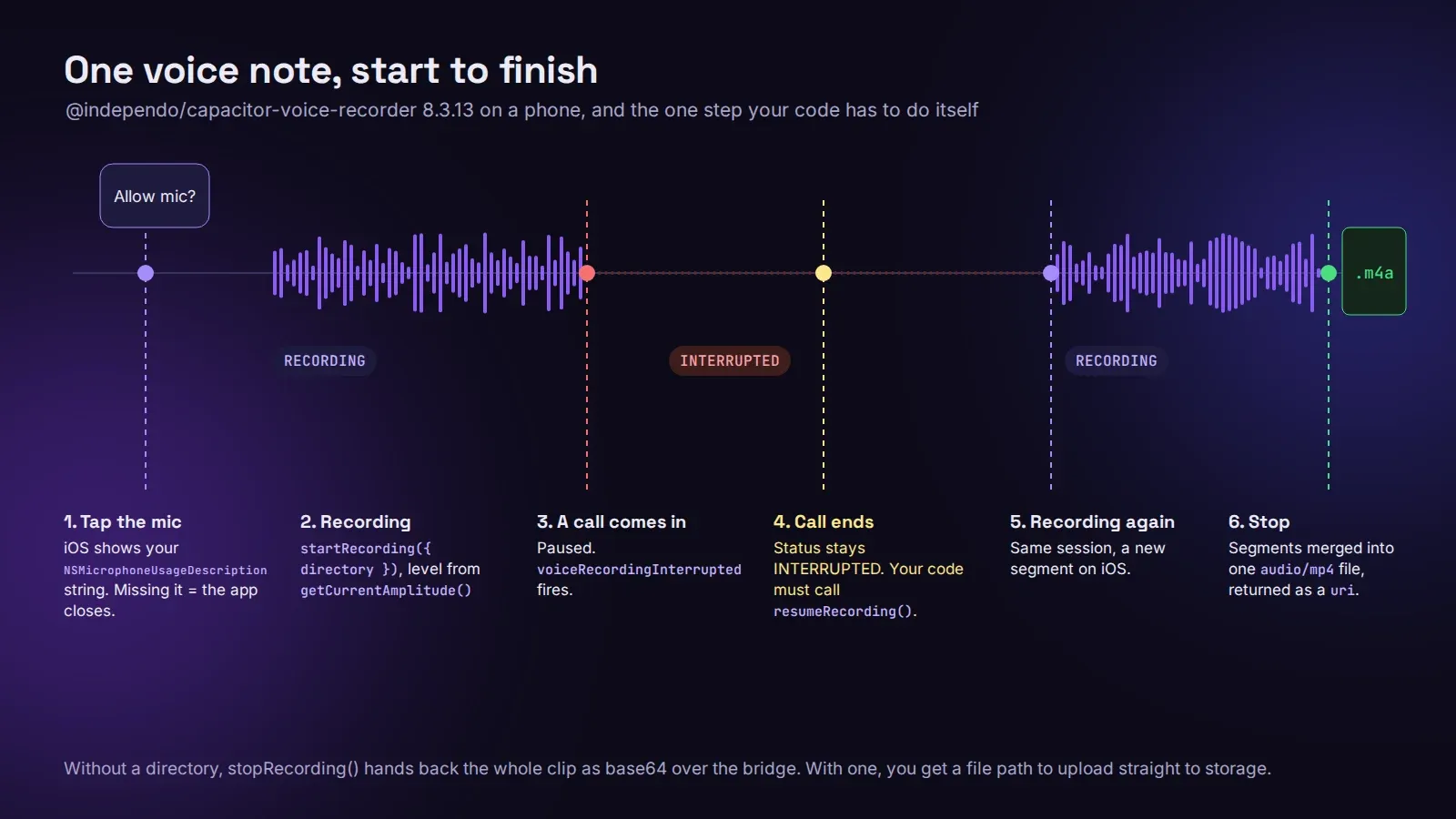
When a call comes in, the plugin pauses the recording, sets the status to INTERRUPTED and fires voiceRecordingInterrupted. When the call ends you get voiceRecordingInterruptionEnded, but the status stays INTERRUPTED until your code calls resumeRecording() or stopRecording(). Nothing resumes on its own. If you don’t listen for that event, the user comes back to a mic button that looks live and isn’t. On iOS the pieces before and after the call get merged when you stop, and if that merge fails you’ll see FAILED_TO_MERGE_RECORDING. On Android, another app holding the mic gives MICROPHONE_BEING_USED.
Don’t pass audio over the bridge as base64
By default stopRecording() returns the whole clip as a base64 string. A few minutes of audio becomes megabytes of text crossing the JavaScript bridge, and on older Android phones that’s where the UI freezes. Set a directory instead:
await VoiceRecorder.startRecording({ directory: Directory.Cache, subDirectory: 'voice' });
const { value } = await VoiceRecorder.stopRecording();
// value.uri points at the file; play it with Capacitor.convertFileSrc(value.uri)
Then upload the file itself to Supabase Storage with the right content type (audio/mp4 or audio/aac), not the base64. Our Capacitor Filesystem post covers reading files back for upload.
Level meters
getCurrentAmplitude() returns a value from 0 to 1. Poll it every 60 to 100 ms for a meter. Faster than that and every call is another trip across the bridge for no visible gain.
Recording with the screen locked
Both plugins stop when the OS suspends the app, unless you ask for more. On iOS that’s the Audio background mode (UIBackgroundModes with audio). On Android it’s a foreground service with a visible notification and the FOREGROUND_SERVICE_MICROPHONE permission, which the plugins don’t create for you. Only do this if recording in the background is the point of the app. Apple’s guideline 2.5.4 allows background modes only for their intended purpose, and a reviewer will ask why a notes app wants to keep the mic on.
If your Lovable app needs voice recording on iOS and Android, we publish Lovable apps to the App Store and Google Play from $300 for up to 5 screens, with native features like this added and tested on real phones. The pricing page shows what each package covers.