Capacitor Stripe Payments in a Lovable App
Capacitor Stripe questions come in two kinds, and you need to know which one you have before you write any code. If your Lovable app sells something people use outside the app (a class booking, a delivery, a physical product, a consultation), Stripe is the right tool on iPhone and Android, and the native PaymentSheet is the best way to show it. If it sells features or content inside the app, Apple wants in-app purchase instead, and that’s a different post: Stripe or Apple in a Lovable app.
This one is about the first kind. Versions and options below are from the @capacitor-community/stripe README and npm, checked November 7, 2026.
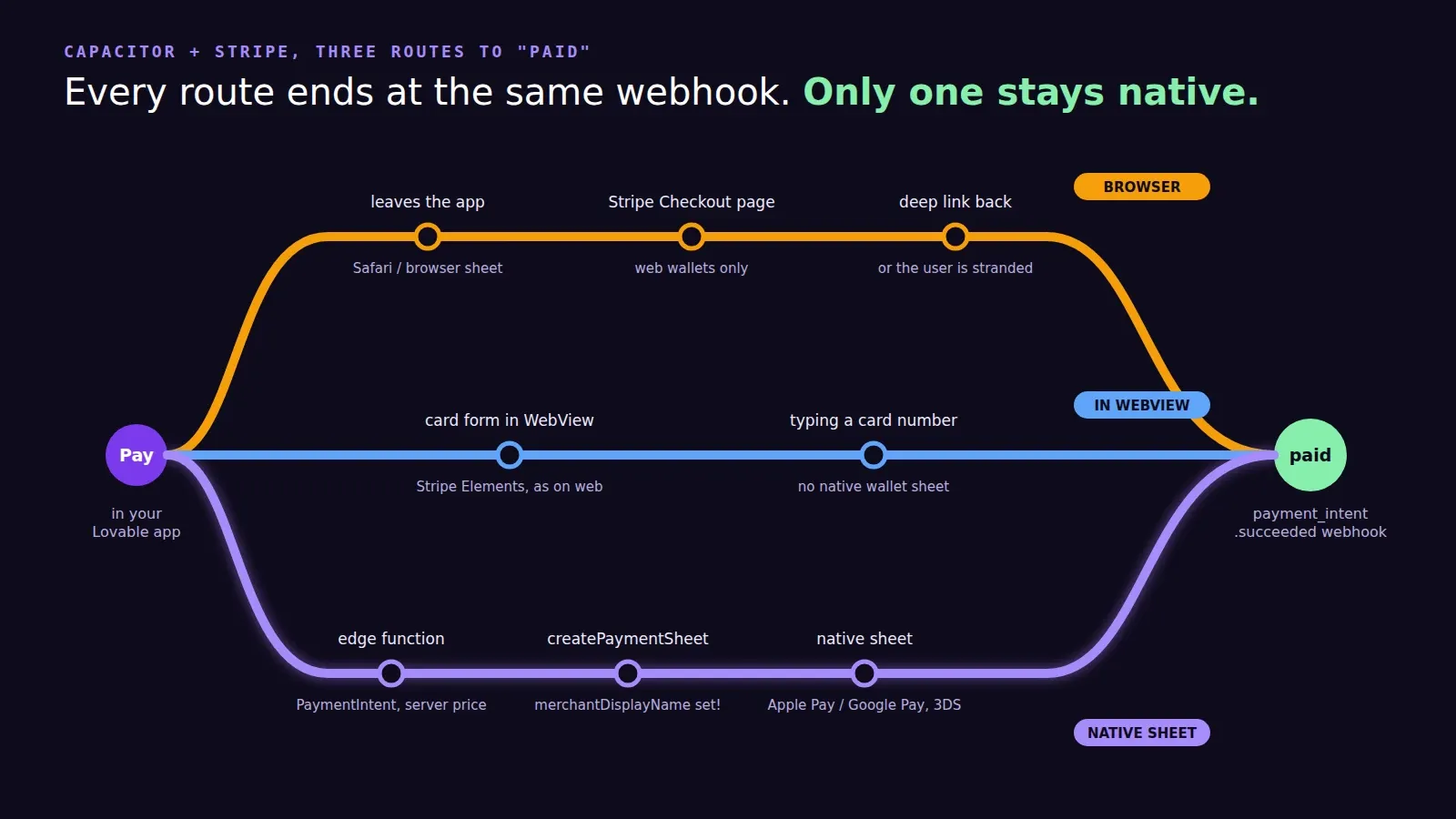
Three ways to take the payment
Open Stripe Checkout in a browser. Your web app probably already does this. In a Capacitor app it opens Safari or a browser sheet, the customer pays, and you need a deep link to bring them back. It works, it’s the least code, and it feels like leaving the app, because it is.
Keep Stripe Elements inside the WebView. The card form from your web build renders fine inside Capacitor. You don’t get the native wallet sheets this way, and on a phone that’s the main thing people want: Face ID or a double-click of the side button and done.
Use the native PaymentSheet. This is what I’d ship. The plugin wraps Stripe’s iOS and Android SDKs, so the sheet slides up natively, shows Apple Pay or Google Pay at the top, saves cards if you want it to, and handles 3D Secure. Your Lovable code calls three functions.
Setting it up
The current release is 8.3.0, published October 5, 2026, and it needs Capacitor 8 (use plugin v7 if you’re still on Capacitor 7). On Android it wants minSdkVersion 24 and builds against SDK 36.
npm install @capacitor-community/stripe@8
npx cap sync
On iOS the first cap update often fails with CocoaPods could not find compatible versions for pod "StripePaymentSheet". That’s just a stale spec repo. cd ios/App && pod install --repo-update fixes it, and you’ll type it again every time Stripe ships a new SDK.
The server side is a single Supabase edge function. It decides the amount, creates a PaymentIntent and returns the client secret:
import Stripe from "npm:stripe";
const stripe = new Stripe(Deno.env.get("STRIPE_SECRET_KEY")!);

Deno.serve(async (req) => {
  const { bookingId } = await req.json();
  const amount = await priceForBooking(bookingId); // from your tables, never from the app
  const intent = await stripe.paymentIntents.create({
    amount,
    currency: "usd",
    automatic_payment_methods: { enabled: true },
    metadata: { bookingId },
  });
  return Response.json({ clientSecret: intent.client_secret });
});
That comment matters more than the rest of the function. I’ve opened more than one Lovable project where the app sent amount: 4900 to the function and the function passed it straight to Stripe. Anyone with the network tab open can book a $49 class for a dollar.
Then the app side:
import { Stripe, PaymentSheetEventsEnum } from "@capacitor-community/stripe";

await Stripe.initialize({ publishableKey: import.meta.env.VITE_STRIPE_PUBLISHABLE_KEY });

const { data } = await supabase.functions.invoke("create-payment-intent", { body: { bookingId } });
await Stripe.createPaymentSheet({
  paymentIntentClientSecret: data.clientSecret,
  merchantDisplayName: "Your Studio",
  enableApplePay: true,
  applePayMerchantId: "merchant.com.yourstudio",
  enableGooglePay: true,
  countryCode: "US",
});
const { paymentResult } = await Stripe.presentPaymentSheet();
paymentResult comes back as paymentSheetCompleted, paymentSheetCanceled or paymentSheetFailed.
The options that bite
merchantDisplayName defaults to the string “App Name”. Leave it out and your customers see “App Name” on the payment sheet. Somebody always leaves it out.
enableApplePay needs applePayMerchantId, which needs a merchant ID in your Apple developer account and the Apple Pay capability in Xcode. enableGooglePay is Android only, and GooglePayIsTesting: true until you go live, or Google Pay will refuse your test cards.
returnURL (iOS only) is a custom URL scheme for payment methods that redirect to a bank and back. Without it, Stripe quietly doesn’t offer those methods. If you set it, forward the incoming URL to Stripe.handleURLCallback() from your app URL handler, the same place your deep links land.
allowsDelayedPaymentMethods is new in 8.3.0 and defaults to off. ACH and SEPA Debit stay hidden unless you turn it on, because the money takes days to settle and you’d have to confirm the booking later.
And one Android-only trap that the README spends a whole section on. Android can recreate the Activity, and with it your JavaScript, while the Stripe sheet is open. The original promise is gone at that point. The plugin keeps the result and hands it to the next Completed, Canceled or Failed listener, so register those listeners once at startup, in main.ts, not in the checkout component. Test it with “Don’t keep activities” switched on in developer options; that’s how you find out before a customer does.
Let the webhook mark it paid
Don’t flip paid = true because the sheet said “completed”. Have a second edge function receive Stripe’s payment_intent.succeeded webhook, verify the signature, and update the booking from the bookingId in the metadata. The sheet result is for the screen. The webhook is for your database. That way the web checkout and the app write paid bookings through exactly the same code.
On the web build, the plugin falls back to Stripe’s PWA elements (stripe-pwa-elements 3.x), so one code path can serve both, though most Lovable apps keep their existing web Checkout and only branch on Capacitor.isNativePlatform().
A native payment sheet is also a real native feature, which helps with Apple’s 4.2 review. If you want the whole thing wired up and the app published, we publish Lovable apps to the App Store and Google Play from $300 for up to 5 screens.