Capacitor vs Cordova for a Lovable App in 2026
Capacitor vs Cordova is a question we still get, usually from a founder who found a 2019 tutorial or a freelancer who has been shipping Cordova apps for ten years and sees no reason to stop. For a Lovable app the answer is Capacitor, and it isn’t close. But the reason people give, that Cordova is dead, is wrong, and it’s worth getting the real reasons straight before you pick.
Cordova is alive. Apache released cordova-ios 8.2.0 on November 9, 2026, two days before we wrote this, with support for Xcode 27’s new iOS 15 minimum and devicectl replacing ios-deploy. cordova-android 15.0.0 in March moved the target SDK to 36 (Android 16) and stopped turning off edge-to-edge by default. Capacitor 8.6.0 shipped on November 10. Both are maintained. They just make very different bets about where your native code lives.
Where the native project lives
This is the whole difference, and everything else follows from it.
In Cordova, the iOS and Android projects are build output. You describe the app in config.xml, list plugins, and cordova platform add ios generates a platforms/ios folder that you’re not supposed to edit, because the next cordova prepare can rewrite it. Want a change in Info.plist? You express it as an <edit-config> block in XML and hope the merge does what you meant.
Capacitor does the opposite. Its docs call each platform project “a source asset instead of a build time asset”. npx cap add ios creates an ios/ folder once, you commit it, and from then on it’s a normal Xcode project. You open Info.plist and change it. Same for AndroidManifest.xml. npx cap sync copies your built web files in and updates plugin dependencies, and it leaves your edits alone.
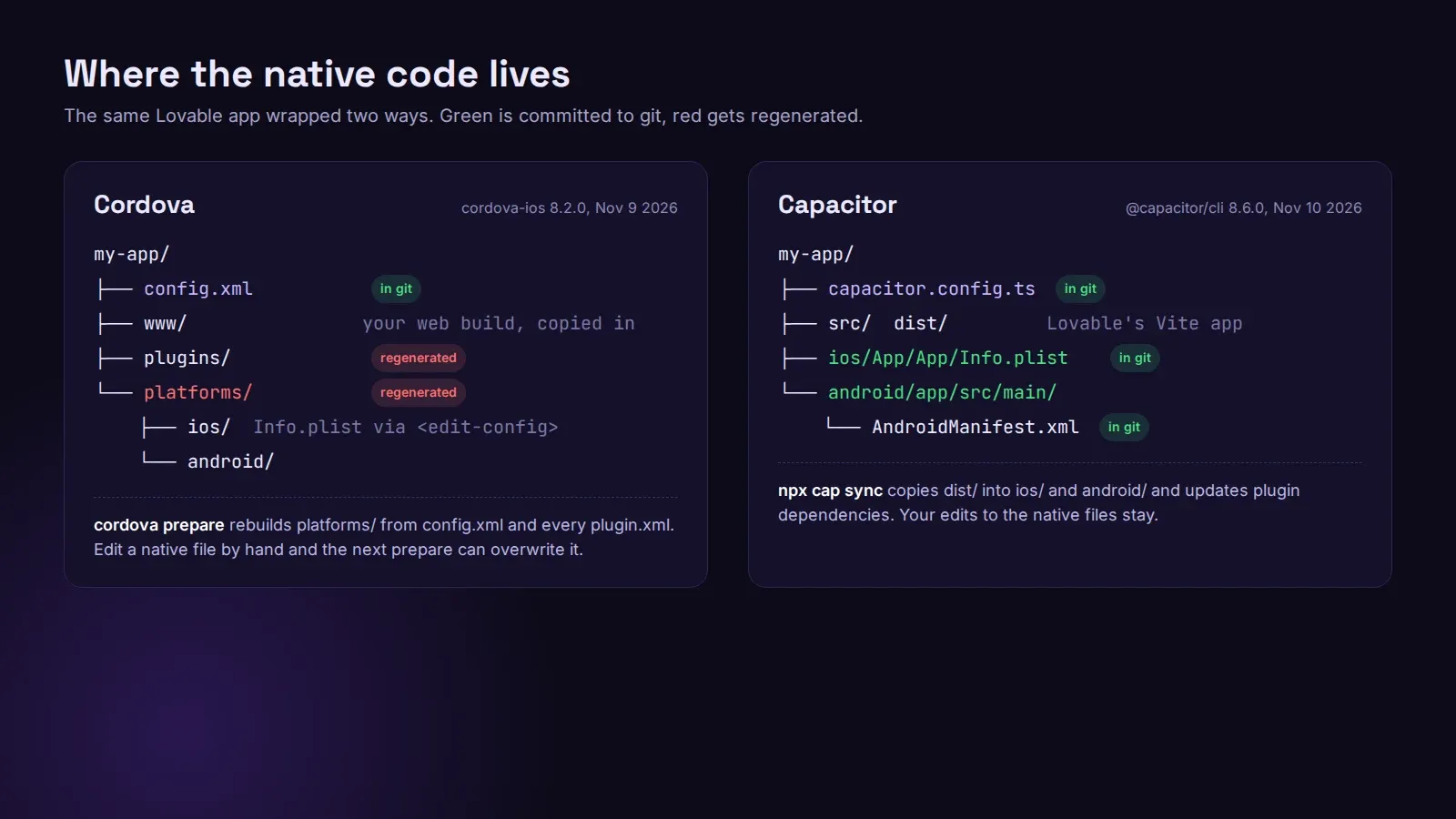
For a Lovable app this matters more than usual. App Store reviewers ask for things you fix in native files: a purpose string for the camera, a privacy manifest, Sign in with Apple, an account deletion flow. With Capacitor that’s a commit someone can read. With Cordova it’s XML that generates the file you actually needed to change, and the first time a plugin’s plugin.xml and your edit-config disagree about the same key, you lose an afternoon.
The Lovable side
A Lovable project is a Vite and React app (TanStack Start on newer projects). Capacitor doesn’t care what produced the web build. You point webDir in capacitor.config.ts at the build output, run the build, run npx cap sync, done. The CLI is installed per project and run with npx cap, so the version lives in package.json next to everything else, and the founder can keep prompting in Lovable while the native folders sit in the same repo.
Cordova expects the web app inside its own www/ and a global cordova CLI. You can make that work with a copy step. Nobody we know does it for a new app anymore, and most current guides for Lovable or Vite assume Capacitor.
Can you keep your Cordova plugins?
Mostly yes. Capacitor runs Cordova plugins: npm install cordova-plugin-whatever, npx cap sync, and it shows up under npx cap ls next to the Capacitor ones. That’s how most old Cordova apps get moved: the plugins come along and get swapped out one at a time.
There are limits, and the Capacitor docs on Cordova plugins are blunt about them. No hooks. No install variables, so a plugin that asks for an API key at install time has to be configured by hand in the native files. And a list of plugins Capacitor skips entirely on cap sync, including:
cordova-plugin-firebaseandcordova-plugin-fcm, the old way to do push. Use@capacitor/push-notificationswith Firebase instead, which we covered in push notifications for a Lovable app.cordova-plugin-qrscanner. The Capacitor barcode scanner replaces it.cordova-plugin-splashscreen,cordova-plugin-statusbarandcordova-plugin-ionic-keyboard, which have official Capacitor plugins.cordova-plugin-code-push,cordova-plugin-ionic-webview,cordova-plugin-wkwebview-engineandcordova-plugin-crosswalk-webview, which don’t make sense inside Capacitor at all.
If one of those is in an old app’s package.json, it isn’t running, whatever the code says.
One more if you keep Cordova plugins around: Apache fixed CVE-2026-47430 in cordova-plugin-inappbrowser 6.0.1 in June, and 7.0.0 followed a week later. If your app opens payment or login pages in the InAppBrowser plugin, check which version is in the lockfile. (Capacitor’s own @capacitor/browser is the simpler choice for opening a page anyway.)
When we’d still use Cordova
An existing Cordova app that works, is in both stores, and has nobody asking for new native features. Moving it costs a week of someone’s time and buys you nothing the users will see. Leave it. Upgrade cordova-android to 15 before Google’s next target SDK deadline, check edge-to-edge on Android 16, and move on.
For anything new, or anything built in Lovable, we use Capacitor. Our Lovable app to App Store and Google Play service starts at $300 and builds the Capacitor app in your own repo. If you already have a Capacitor app, we finish and ship that one at the same published prices. If you’re still deciding whether a WebView app is enough at all, Capacitor or native is the page for that.