Lovable Website to App: What Apple Accepts
Can you turn a Lovable website into an app? Yes, technically in an afternoon. Whether Apple lets it into the App Store is a different question, and for a plain website the answer is usually no. Guideline 4.2 in Apple’s App Review Guidelines, checked November 17, 2026, says an app “should include features, content, and UI that elevate it beyond a repackaged website”, and 4.2.2 adds that apps “shouldn’t primarily be marketing materials, advertisements, web clippings, content aggregators, or a collection of links.”
Read that list again with a Lovable project in mind. A landing page with a waitlist form is marketing material. A directory of links is a collection of links. A blog is, at best, a content aggregator. That’s most of what people build in Lovable on day one, and it’s exactly what gets bounced.
So the first job isn’t technical. It’s working out whether you have a website or an app.
Website or app? Four questions
Ask yourself honestly:
- Does someone log in and see something that’s theirs (bookings, orders, a dashboard, saved items)?
- Would they open it more than once a week?
- Is there something a phone does better here, like a camera, notifications, location, or offline use?
- If you deleted the marketing pages, would anything be left?
Two or more yeses and you have an app hiding inside a website. Zero or one, and you have a website, and the right move is to make the website better on mobile and skip the stores. I’ll say that bluntly because we’ve had founders pay Apple $99, spend two weeks on screenshots, and get the same 4.2 rejection three times for a site that should never have been submitted.
The three routes
Leave it as a website people can install. On iPhone, a site can be added to the Home Screen and opened full screen, and since iOS 16.4 a Home Screen web app can receive web push notifications. No review, no fee, no wait. The catch is discovery: nobody finds you by searching the App Store, and most users never tap Share and then Add to Home Screen. For a content site or a tool people use from a laptop, this is still the right answer.
Wrap it with Capacitor and add the native parts. This is what we do by default. Capacitor puts the same code Lovable writes into a real iOS and Android project, so you keep building in Lovable and ship updates from it. On its own that’s still a repackaged website as far as 4.2 is concerned. What gets it through review is the layer on top: push notifications that actually do something useful, a native share sheet, a camera or document scanner flow, offline storage for the screens people check on the train, Sign in with Apple (or another option that meets guideline 4.8) when you offer Google login, and account deletion inside the app. Two or three of those, used for real, is usually enough.
Rebuild it natively. React Native with Expo, or Flutter, on the same Supabase backend. It’s the right call for apps people live in all day: feeds, chat, maps, video. It’s overkill for a booking app that people open twice a week.
The rejection we see most
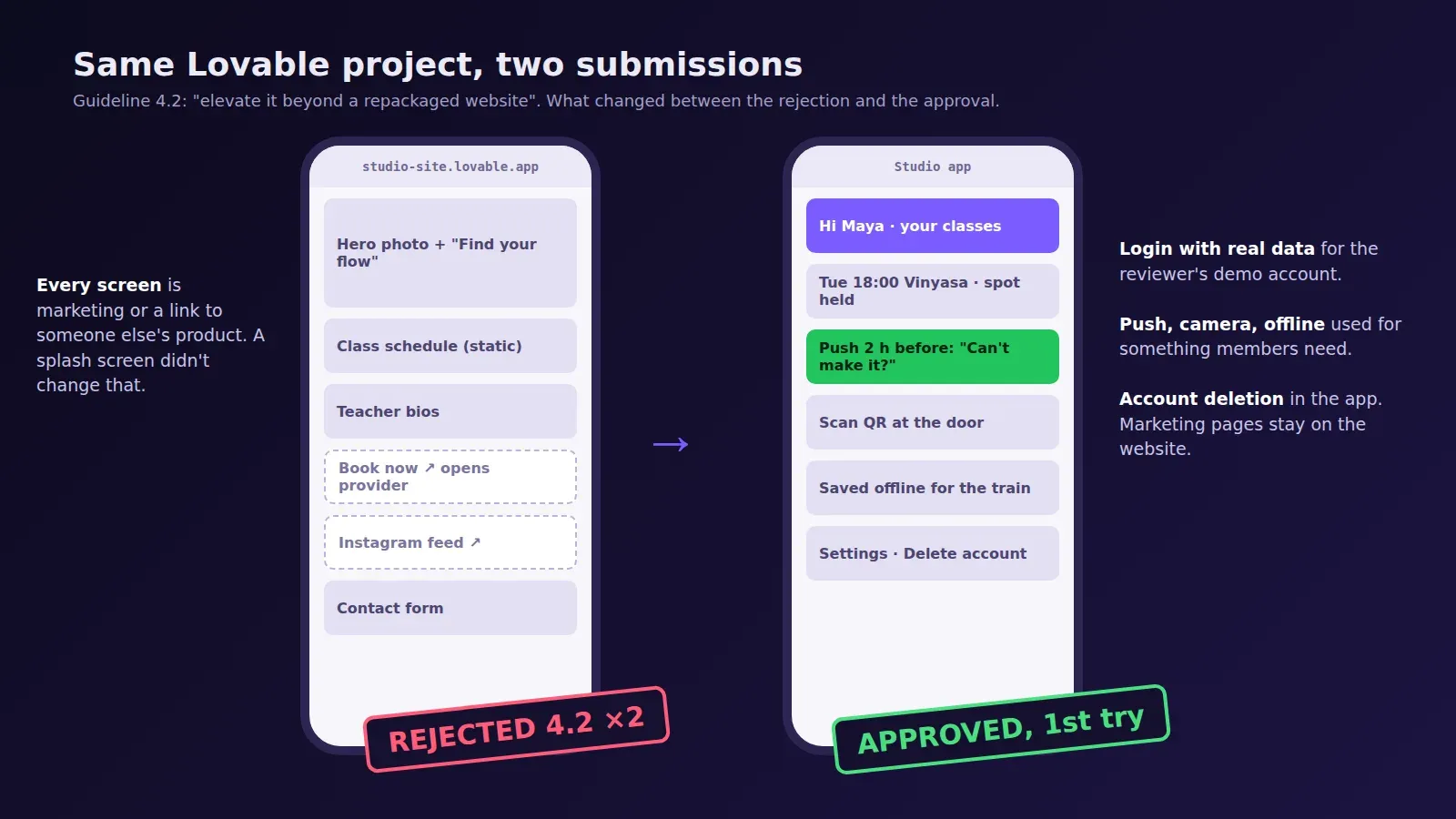
A founder sent us his Lovable project in September, a site for a yoga studio: class schedule, teacher bios, a contact form, an Instagram feed, and a “Book now” button that opened the studio’s booking provider in a new tab. He’d wrapped it with an online converter and submitted. Rejected under 4.2 in about 30 hours. He added a splash screen and resubmitted. Rejected again, same guideline, same wording.
There was no app in there. Every screen was either marketing or a link to someone else’s product. What we ended up building was small: members log in, see their own upcoming classes, get a push 2 hours before class with a “can’t make it” button that frees the spot, and can scan the QR code at the door. The marketing pages stayed on the website, where they belong. That version went through on the first submission.
The lesson I took from that one: don’t add native features to a website. Find the part of the website that’s already an app and give it native features.
What the reviewer needs to see
Apple’s reviewer has a few minutes with your build. Make those minutes count.
Give them a demo login in App Review Information that already has data in it. An empty account on a booking app shows an empty list, and an empty list looks like a wrapper. Put the native features where they’ll be found in the first minute, not three menus deep. If your app has sign-up, it needs account deletion in the app itself, not an email address to write to. And if the app shows anything from the open web (a blog, a news feed), keep it out of the main tabs.
Don’t hide the fact that it’s built on web technology. Apple doesn’t reject Capacitor apps for being Capacitor apps. Plenty of apps in the store are built this way. It rejects apps that don’t do anything a browser couldn’t.
What it costs
The Apple Developer Program is $99 a year, Google Play $25 once. Our packages are the same for the Capacitor path and a native rebuild: $300 for up to 5 screens, $600 for up to 15, $1,000 for 25 or more, including the store submission. If you already got a 4.2 rejection on a wrapped app whose code we can edit, the App Store rejection fix is $350 flat and we resubmit within 3 days.
We do this for websites built outside Lovable too (React, Vite, Next.js, plain HTML), at the same prices. The publishing service has the details, and the pricing page shows what counts as a screen.
If you’re not sure which side of the website-or-app line you’re on, send us the link. We’ll tell you, even when the answer is “keep it a website.”