How to Publish an App on Google Play: The Forms
How do you publish an app on Google Play? You pay Google’s one-time $25 for a developer account, build an Android App Bundle that targets Android 16 (API level 36, required for new apps and updates since August 31, 2026), create the app in Play Console, fill in the App content forms and the store listing, run a closed test, then apply for production. On a personal account made after November 2023 that closed test needs 12 testers who stay opted in for 14 days. Everything here was checked against Google’s Play Console help on November 19, 2026.
The build and the testing rules have their own posts: the Android App Bundle walkthrough for the build and signing, and Getting your Lovable app on Google Play for the 12 testers. This one is the paperwork in between, which is where we see most Lovable apps sit for a week with a yellow “Needs attention” badge. The same forms apply to any Android app, Lovable or not. Google doesn’t ask what built it.
App content, top to bottom
Play Console puts these under App content (in the Policy section), split into “Needs attention” and “Actioned”. You can’t send a release for review while something sits in the first tab.
Privacy policy. A public URL, https, no login, no PDF, reachable from every country. Google wants it linked on the store listing and inside the app. A Lovable app usually has a /privacy route already; check it actually names your app and lists Supabase, your analytics and anything else the app sends data to. The template one that says “Your Company” gets flagged.
App access. If any part of the app is behind a login, you give Google a way in. Up to five sets of instructions, and an “Any other instructions” box for one-time codes and two-factor. This is the form people rush. Give them a working test account with real-looking data in it, not an empty dashboard.
Ads. Yes or no. House ads for your own products count as ads. A “More apps” page that doesn’t interrupt anything doesn’t.
Content rating. A questionnaire, then IARC gives you ratings for each region. It takes ten minutes and Google’s help is blunt: unrated apps may be removed.
Target audience and content. Pick age groups. If you tick anything under 13 you’re in the Families policy and the review gets stricter, so don’t tick it “to be safe” if your app is a B2B scheduling tool.
Data safety. The long one, and the one that’s wrong most often. “Collect” means the data leaves the phone, by your code or any SDK you included. So Supabase auth means you collect email addresses. Sentry means crash logs. PostHog or Google Analytics means app interactions and probably device IDs. Google says plainly that its review doesn’t verify these answers and that you alone are responsible for them, which sounds relaxed until an enforcement email arrives. In the same form are the data deletion questions: if users can create an account, you need an in-app way to delete it and a web page where they can ask for deletion, and you paste that URL here.
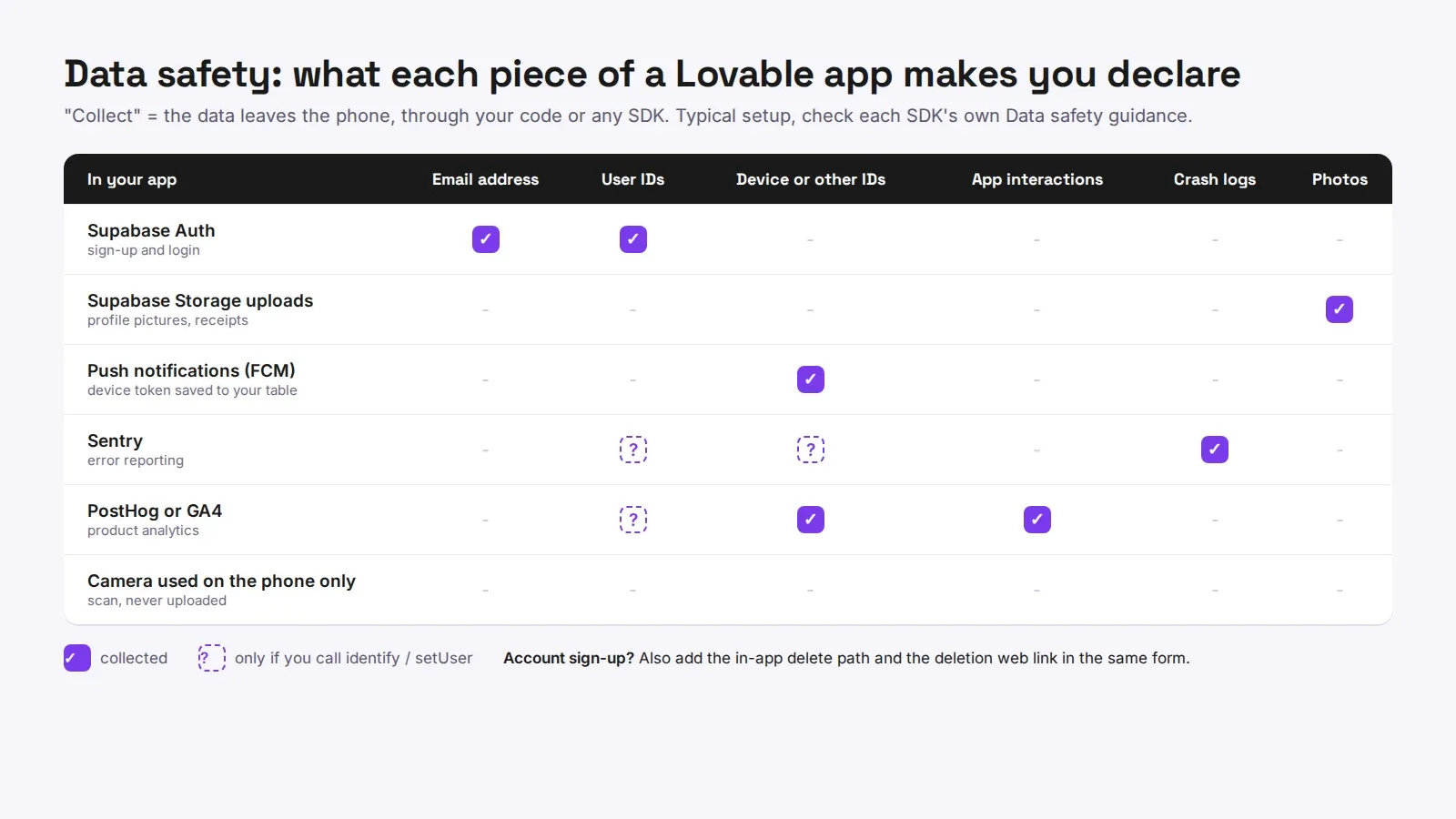
Advertising ID, government apps, financial features, health apps. Short declarations. Most Lovable apps answer no to all of them. If your app touches loans, payments between people, or health data, read each one properly; those trigger their own policies.
The store listing
App name, an 80-character short description, the full description, a 512 x 512 icon (32-bit PNG with alpha, under 1 MB), a 1024 x 500 feature graphic (no alpha) and at least two phone screenshots, between 2 and 8, 9:16 or 16:9, each side 320 to 3,840 px. The feature graphic is the one people forget, and the Save button stays grey without it.
Do the screenshots from a real phone or the emulator, not the Lovable preview in a browser. A reviewer comparing your listing to the installed app notices the browser bar.
A rejection that wasn’t about the app
A client of ours, a small gym chain, had a Capacitor build that passed every test we threw at it. Google rejected it twice in four days. Both emails said Google couldn’t access parts of the app. The test account in App access was fine. The problem was that the app sent a magic link to log in, and the reviewer had no inbox for that address. We switched the review account to a password login that only worked for that one email, wrote that in the instructions box, and it went through the next day.
Then the release
Upload the bundle to a closed testing track, add your testers, wait out the 14 days if you’re on a personal account, then apply for production access from the Dashboard. Google’s help says that review “usually takes seven days or less”. After that, the production release itself goes through review too. Staged rollout to 10 or 20 percent first is worth it for the first version, because a crash on one Android maker shows up there and not in your testing.
If you’d rather not spend two weeks on forms, we publish Lovable apps to Google Play and the App Store, submission done, at a one-time price: $300 up to 5 screens, $600 up to 15, $1,000 for 25 or more (pricing). Already rejected? The rejection fix is $350 flat. The App Store version of these forms is a separate post, because Apple asks for different things in a different order.