How to Publish an App on the App Store: The Forms
How do you publish an app on the App Store? You join the Apple Developer Program ($99 a year), build the app with Xcode 26 and the iOS 26 SDK (required for uploads since April 28, 2026), upload it to App Store Connect, fill in about nine forms about the app, and submit it for review. Most first reviews come back in a day or two. Building the app is the part everyone worries about. The forms are where people actually lose a week.
Our Lovable to App Store guide covers getting a Lovable project into Xcode with Capacitor and uploading the build. This post is the other half: what App Store Connect asks you once the build is there, in the order you’ll meet it, and which answers send Lovable apps back. If your app was made some other way, React, Vite, a plain web app, the forms are identical. Apple doesn’t care what wrote the code.
The app record
Under Apps, the plus button, New App. You pick the platform, a name (30 characters, and it has to be unused on the store, which is where “Habit Tracker” becomes “Habit Tracker: Daily Streaks”), the primary language, a bundle ID that has to match the one in Xcode exactly, and a SKU, which is just your own reference and nobody sees it. Get the bundle ID right. You can’t change it later without making a new app.
App Privacy
This is a questionnaire about every kind of data your app collects, whether it’s linked to the user, and whether it’s used for tracking. It becomes the “nutrition label” on your store page. You also need a public privacy policy URL.
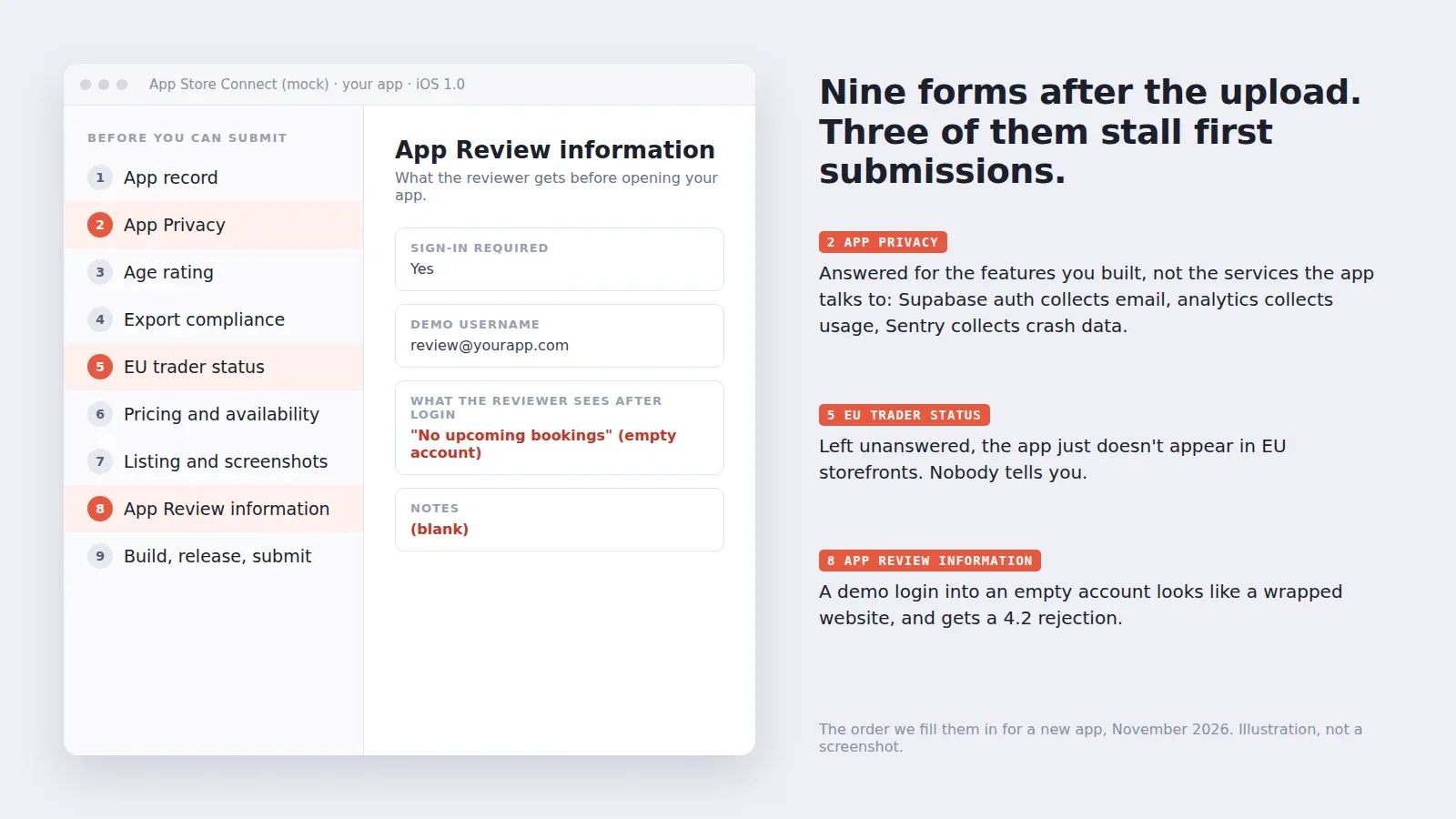
Lovable apps get this wrong in a specific way. The founder answers for the features they built and forgets the services the app talks to. Supabase auth means you collect an email address. PostHog or Google Analytics means usage data. Sentry means crash data and often device IDs. If you show ads or share data with a broker, that’s tracking, and you’ll also need the App Tracking Transparency prompt. Apple’s reviewer can see network traffic, and a label that says “Data Not Collected” on an app with a sign-up screen is an easy rejection.
Age rating
Apple rebuilt this in 2025. There are now 13+, 16+ and 18+ ratings next to the old 4+ and 9+, and new questions about things like in-app controls, medical or wellness content and user-generated content. Every app had to answer the new set by January 31, 2026, and new apps answer it on the way in. Be honest about chat and user posts. An app where users can message each other needs a way to report and block, and the questionnaire will ask.
Export compliance
Every build asks whether your app uses encryption. Almost every app does, because HTTPS is encryption, and almost every app qualifies for the exemption because it only uses standard encryption. Add ITSAppUsesNonExemptEncryption set to NO in your Info.plist and the question stops appearing on each upload. If you wrote your own crypto, that’s a different conversation and you probably know it.
EU trader status
If you want to be on the store in the EU, the Digital Services Act requires Apple to show whether you’re a trader, and if you are, your address, phone and email go on the product page. A company selling something is a trader. A hobby project might not be. Skip this and the app simply doesn’t show up in EU countries. People find out when a friend in Berlin can’t find it.
Pricing, availability and the listing
Price (free is a tier), countries, and then the store page itself: subtitle, description, keywords (100 characters, commas, no spaces needed), support URL, and screenshots. For iPhone you need the 6.9-inch size; if the app runs on iPad, iPad screenshots too. We wrote up the exact screenshot sizes separately because it trips up everyone.
App Review information
This one decides more first submissions than anything else on the list. Apple wants a contact, notes for the reviewer, and if the app has a login, a demo account that works.
A founder we worked with in October submitted a booking app with a demo login that pointed at a fresh account. The reviewer logged in, saw “No upcoming bookings”, tapped around three empty screens and rejected it under guideline 4.2 for minimum functionality, the same rejection a wrapped website gets. The app was fine. The account was empty. We put a week of fake bookings into the demo user, wrote two lines in the notes about where the push reminder shows up, and it was approved on the next pass in 19 hours.
Two more things the reviewer checks here. If people can create an account, they must be able to delete it inside the app, not by emailing you. And if you offer Google login, guideline 4.8 means you need Sign in with Apple or another privacy-focused option too.
Submit, and what happens next
Add the build to the version, answer the content rights question (do you use third-party content you have rights to), choose a release option (manually, automatically after approval, or on a date) and press Add for Review. Updates can use phased release, which rolls out to users over seven days and lets you pause if something breaks. Use it. How long the wait is, and how to read the status changes, is in our App Store review time post.
If you’d rather not fill it in
All of this is included when we publish an app for you: the Capacitor build, every form above, the listing and the replies to the reviewer. It’s $300 for up to 5 screens, $600 for up to 15 and $1,000 for 25 or more (details). Already rejected? The App Store rejection fix is $350 flat and we resubmit within 3 days. Built your app with Claude Code, Cursor or Bolt instead of Lovable? That works too. Shipping to Android as well? Google asks for a different set of forms, in how to publish an app on Google Play.