Capacitor JS Explained for Lovable Founders
What is Capacitor JS? The Capacitor docs call it “a cross-platform native runtime that makes it easy to build performant mobile applications”, and say it “can be dropped into any existing modern JavaScript project.” In plain words: it takes the web app you already have, puts it inside a real iOS and Android project, and gives your JavaScript a bridge to the phone’s native features. It’s free and MIT-licensed, made by the Ionic team (the docs now carry an “An OutSystems Company” banner).
As of November 23, 2026, the current release on npm is @capacitor/core 8.6.2, published November 12. Capacitor 9 is at 9.0.0-rc.0, a release candidate published the same day. It isn’t final yet.
That’s the whole definition. The useful part is what it means if you built your app in Lovable and want it in the App Store.
What Capacitor actually adds to your project
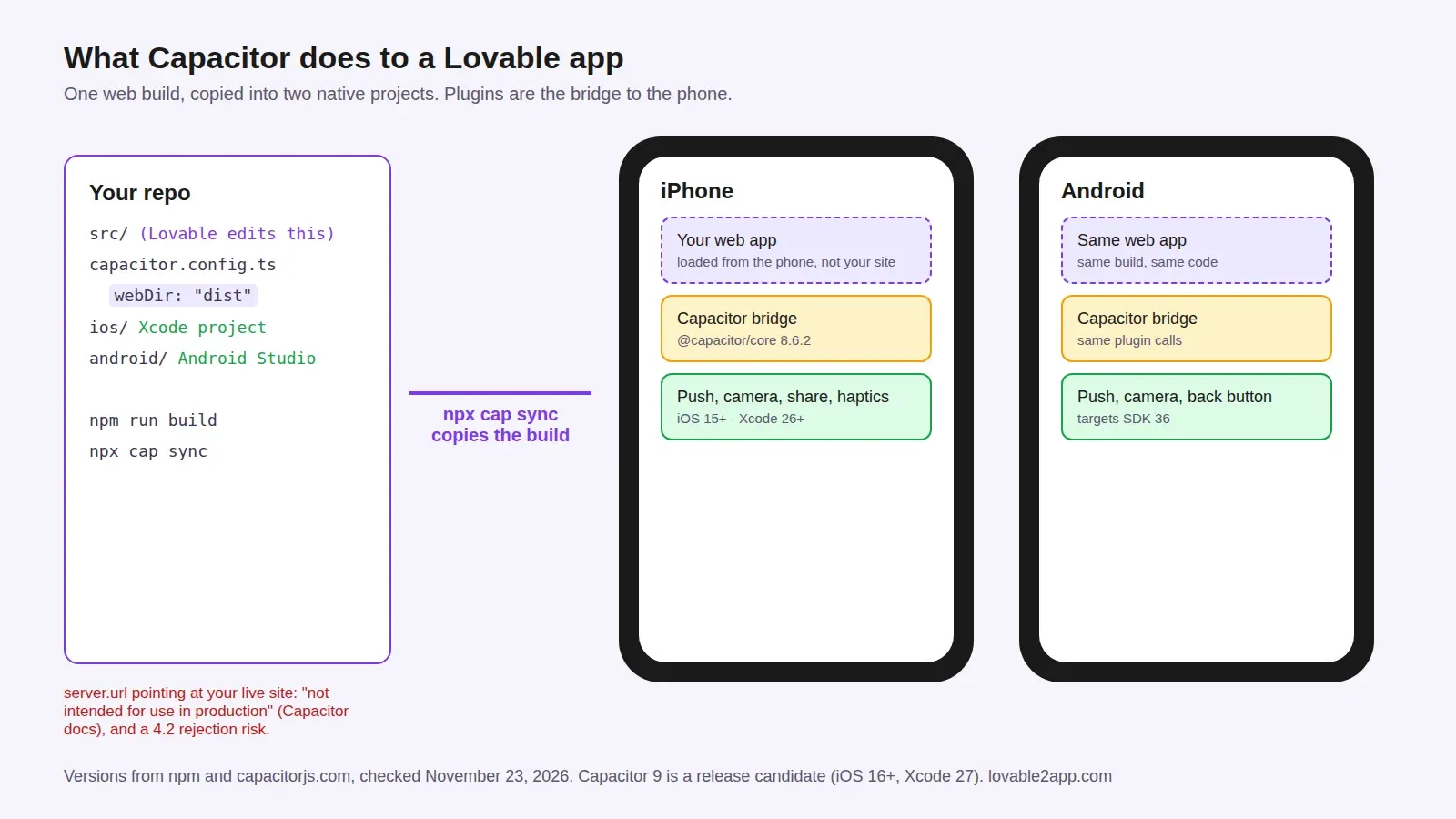
You run npm install @capacitor/core @capacitor/cli, then npx cap init, then npx cap add ios and npx cap add android. Two new folders appear: ios/ and android/. Those are ordinary native projects. You open them in Xcode and Android Studio like any other app.
Your web code doesn’t move. It still lives in src/. When you build, Capacitor copies the built files (the folder named in webDir in capacitor.config.ts) into each native project, and the app loads them from the phone itself. Not from your website. That difference matters more than anything else in this post, and I’ll come back to it.
Native features come as plugins. @capacitor/push-notifications, @capacitor/camera, @capacitor/haptics, @capacitor/share, and so on. You call them from JavaScript like any other import. On the web they fall back or do nothing; on the phone they talk to iOS or Android.
The version floors right now
Capacitor 8 needs Xcode 26 or newer and sets the iOS deployment target to 15.0. On Android it targets SDK 36, which is exactly what Google Play has required for new apps and updates since August 31, 2026. If you set up Capacitor last year and never upgraded, you’re likely on 7 and can’t ship an Android update. We wrote the Capacitor 8 upgrade up separately because it bites a lot of people.
Capacitor 9’s upgrade guide already lists its floors: Xcode 27 or newer and iOS 16.0 or greater. My advice is boring. Don’t start on the release candidate for an app you’re submitting this month. Start on 8.6, upgrade once 9 is final and your plugins have caught up.
One date to put in your calendar: CocoaPods trunk goes read-only on December 2, 2026. Pods that already exist keep working. But Capacitor 8 already makes Swift Package Manager the default for new iOS projects, and if your ios/ folder is still on CocoaPods, the day a plugin you need only ships a new version through SPM, you’ll be migrating under pressure. Do it on a quiet week instead.
Why Lovable apps need one extra step
Most Capacitor tutorials assume your build produces a folder of static files with an index.html. Older Lovable projects did: a Vite build into dist/. Lovable projects created since May 2026 are TanStack Start apps with server-side rendering, and their build doesn’t produce that folder in the shape Capacitor expects.
The tempting fix is to skip the build and point Capacitor at your live website with server.url. Capacitor’s own config reference says that option is “not intended for use in production”. Apple doesn’t like it either. An app that just loads a website is the classic guideline 4.2 rejection (“Minimum Functionality”), and we see it constantly.
We had a founder last month who’d done exactly that. The app was a booking tool, it loaded https://hisapp.lovable.app inside the shell, and it was rejected twice. The second time he’d added a splash screen and thought that counted as native. It didn’t. What got it approved was a client-only build bundled into the app, push notifications for booking reminders, and the share sheet on the confirmation screen. Three plugins and a build change. About four days of work, and most of that was waiting on review.
Capacitor or React Native?
If your app is mostly forms, lists, dashboards and checkout, Capacitor. You keep editing in Lovable, the phone apps update from the same code, and the native features you need for review are plugins.
If your users live in the app for an hour a day (a feed, chat, maps, video), the web view starts to show. Scroll feel, memory on older Androids, gestures. Then a React Native rebuild on the same Supabase backend is worth the extra cost. We compared both properly in Capacitor vs React Native for a Lovable app.
I’ll say it flatly: most founders asking this question should start with Capacitor. The rebuild can come later, once you know people use the app daily.
What it doesn’t do for you
Capacitor gives you the projects. It doesn’t give you an Apple Developer account ($99 a year), signing certificates, App Store screenshots, a privacy policy, account deletion inside the app (Apple requires it if you have sign-up), or review notes with a demo login. That paperwork is where first-time submissions actually stall. Not the code.
It also doesn’t make a web app feel native by itself. Safe areas, the keyboard pushing your inputs up, the Android back button closing the app instead of going back a page. Each one is a small fix, and each one is something a reviewer notices on a real phone.
If you’d rather not do this yourself
We publish Lovable apps to the App Store and Google Play with Capacitor: $300 up to 5 screens, $600 up to 15, $1,000 for 25 or more, and you keep building in Lovable afterwards. We also do it for other web apps (React, Vite, Next.js) at the same prices. Already rejected? The App Store rejection fix is $350 flat, resubmitted within 3 days.