How to Make an Android App: The Code Is the Quick Part
How do you make an Android app? Build it in Android Studio with Kotlin, in React Native with Expo, or wrap a web app you already have with Capacitor. Then open a Google Play developer account ($25, once), and if it’s a new personal account, run a closed test with at least 12 testers for 14 days in a row before Google lets you apply for production. The build has to target Android 16 (API level 36), which Play has required for new apps and updates since August 31, 2026.
Unlike iPhone apps, none of this needs a Mac. Any Windows, Linux or macOS laptop runs Android Studio, and so does a cheap cloud build.
What surprises people is the order of the work. The code can be ready in a week. The calendar after it is where most first Android launches lose a month.
Pick how you’ll write it
Kotlin and Jetpack Compose in Android Studio. Google’s own route. Android Studio is free (the current release is Rabbit 2, version 2026.2.2) and comes with the emulator, the build tools and the signing wizard. It’s the right call if Android is the main platform and you’ll keep a developer who knows it. It’s the wrong call if you also need an iPhone app, because you’ll write that one again in Swift.
React Native with Expo. One TypeScript codebase for Android and iPhone, built in Expo’s cloud. Expo’s pricing, checked November 21, 2026: the Free plan includes up to 15 Android builds, Starter is $19 a month with $45 of build credit, and an Android build after that is $1 on a medium worker or $2 on a large one. If you already have a web app, though, the UI is a rewrite.
Your web app, wrapped with Capacitor. If the app already exists (in Lovable or any React or Vue project), Capacitor adds a real Android Studio project around the same code. You keep building the web app. The Android build carries each change. We walked through the setup, including the webDir mix-ups, in Capacitor Android for a Lovable app.
Google is gentler than Apple about wrapped apps. Play has no rule like Apple’s 4.2 that rejects a website in a box by name. It does reject apps that are broken, spammy or mostly a link to somewhere else, so the same advice holds: a proper offline screen, push notifications if your app has anything to notify about, and the system back button doing something sensible. That last one is the bug we fix most often. In a wrapped app the back button closes the whole app from any screen unless you handle it.
The Play account, before you need it
Open the Play Console account on day one, not the day the app is done. It’s a one-time $25, and Google verifies your identity: a government ID for a personal account, a D-U-N-S number and an organisation check for a company. That can take a few days on its own.
Personal or organisation matters more than it looks. Personal accounts created after November 13, 2023 get the testing rule below. Organisation accounts don’t. If the app is for a business and you already have a D-U-N-S number, I’d register as the company and skip two weeks.
The 14 days nobody plans for
New personal accounts must run a closed test with at least 12 testers who stay opted in for 14 continuous days before the Production tab unlocks. Then you apply for production access, and Google says the review of that application “usually takes seven days or less”. After that comes the normal review of your first production release.
So the honest timeline from “the build works” to “anyone can install it” on a new personal account is about three weeks, if nothing goes wrong.
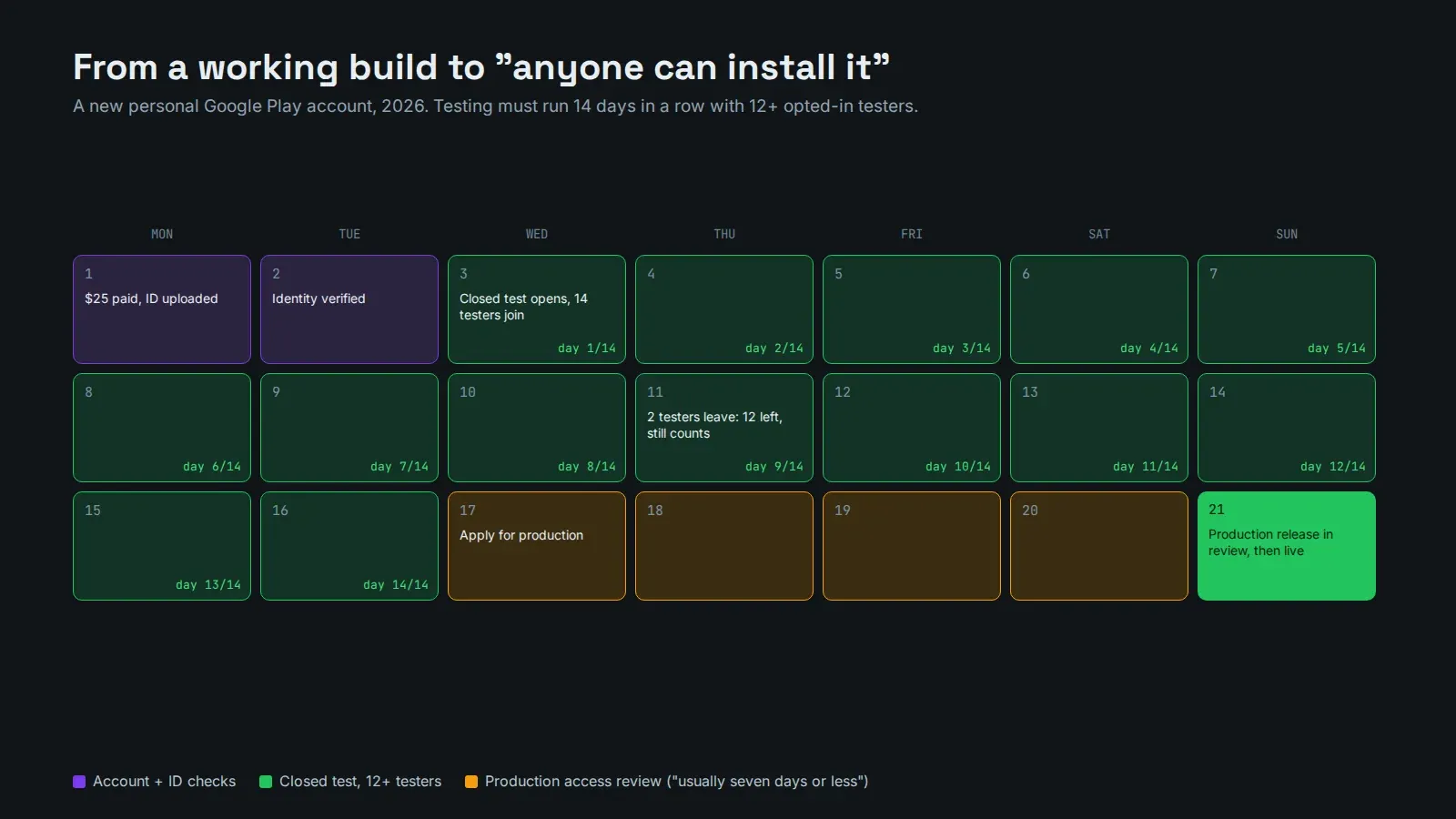
“Continuous” is the word that catches people. A founder we worked with in October had 14 friends opt in on a Monday. On day nine, two of them left the test because they’d swapped phones and didn’t reinstall it. That put him at 12, which still counted. If a third had left, the clock goes back. He’d recruited exactly enough and spent the second week messaging people to keep the app installed. Get 20, not 12.
Testers need a Google account and an Android phone, and they join through an opt-in link from the closed testing track. They don’t have to use the app every day, but Google asks about their feedback when you apply for production, so ask them for some.
The build Google accepts
Play takes Android App Bundles (.aab), not APKs, for new apps. The bundle is signed with your upload key, and Google re-signs it with the app signing key it holds for you (Play App Signing). Keep the upload keystore and its passwords somewhere you won’t lose them. You can ask Google to reset a lost upload key, but it takes time and it always happens the week you need a hotfix. We wrote up the bundle side, keystore included, in Android App Bundle for a Lovable app.
Set targetSdkVersion to 36. A Capacitor 8 project already does. Older Capacitor projects need the upgrade first.
Outside Google Play
You can also hand people an APK file directly. That still works, but it’s changing: under Google’s Android developer verification, from September 30, 2026, certified devices in Brazil, Indonesia, Singapore and Thailand need apps from verified developers, and Google says it will expand that globally in 2027. Apps on Play are registered automatically. If you distribute only outside Play, you verify through the separate Android Developer Console.
For a business app aimed at the US or Europe, Play is still the only route I’d recommend.
What it costs, outside of your own time
| Item | Cost |
|---|---|
| Google Play developer account | $25, once |
| Android Studio | Free |
| Expo builds (if you use Expo) | 15 free, then $1 or $2 a build, or Starter $19/mo |
| A Mac | Not needed for Android |
| Closed testing (new personal accounts) | Free, but 12 testers for 14 days |
If you’d rather we do the Android side, we publish Lovable apps to Google Play and the App Store at a fixed $300, $600 or $1,000 depending on screen count, in your own developer accounts, and we start the closed test the first week so the 14 days run while the native parts get built. The same works for most other web apps. The full forms walkthrough is in How to publish an app on Google Play, and the packages are on the pricing page.